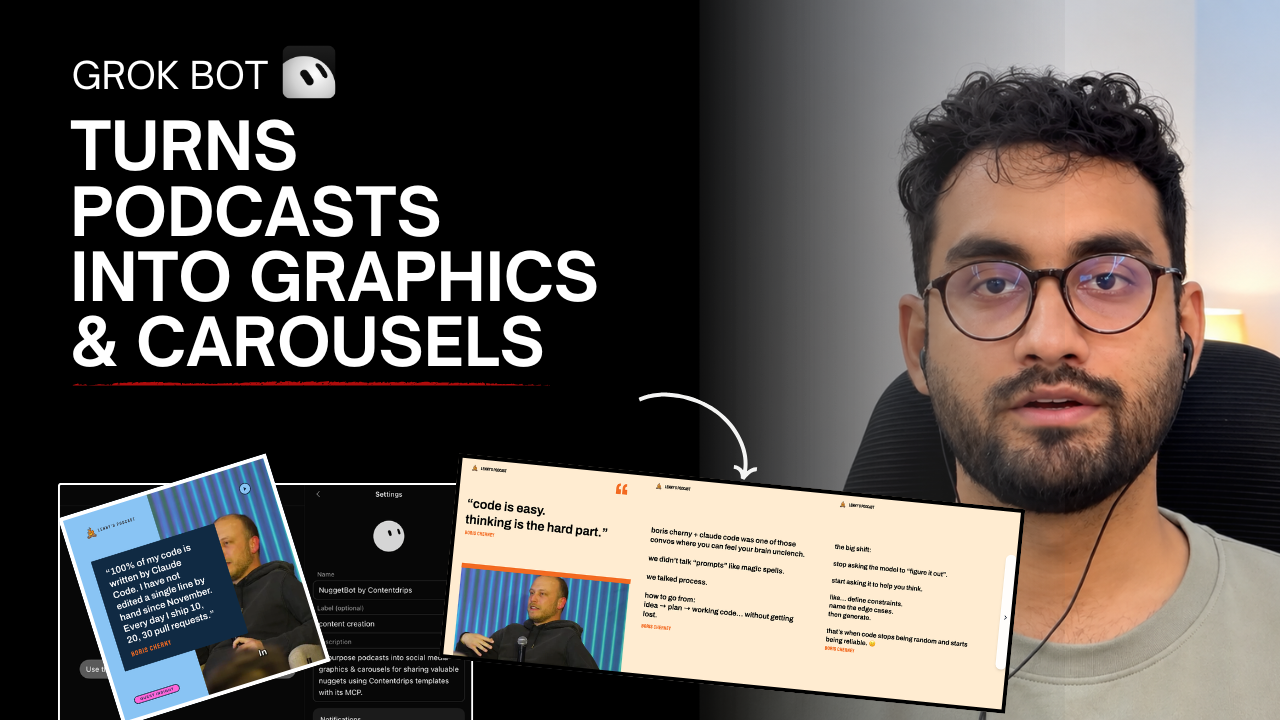
Quick answer: Grok Bot can pull the transcript from any podcast episode, surface the strongest quotes and takeaways, and hand them straight to Contentdrips to generate on-brand quote graphics and carousels, no manual transcribing, copywriting, or design work required once your templates are set up. It can also repurpose podcasts into social media posts at scale. The connection between the two runs through the Contentdrips MCP server, which is what lets an AI agent like Grok Bot actually operate your Contentdrips workspace instead of just chatting about it.
Why Podcasters Need This Workflow
Long-form podcasts take hours to record, edit, and publish, but most episodes get one real moment of visibility: the day they go live. After that, the insight buried at minute 34 of an hour-long conversation just sits there, unheard by anyone who didn’t listen live.
Turning that moment into a branded quote graphic or a multi-slide carousel is one of the highest-leverage things a podcaster can do, because it’s a format built for discovery: LinkedIn and Instagram both reward multi-slide, high-dwell-time content, and a strong carousel can reach people who will never open a podcast app. The problem has never been whether repurposing works, it’s that doing it manually (listen, transcribe, write, design, export, upload) takes real time every single week, so most shows either do it inconsistently or skip it entirely.
That’s the gap Contentdrips Grok Bot closes.
What Is Grok Bot + Contentdrips MCP, Actually?
Grok Bot is xAI’s agentic assistant. It doesn’t just answer questions in a chat window; it can take actions on connected tools on your behalf: reading a transcript, booking something, or, in this case, triggering a design tool.
For Grok Bot to actually operate Contentdrips (rather than just describe how to use it), the two need a shared protocol to talk over. That’s what Contentdrips MCP is: an MCP (Model Context Protocol) server that exposes Contentdrips’ template, image, and rendering functions as tools an AI agent can call directly. Once Grok Bot is connected to that server, it can populate a real Contentdrips template with real text and real images, not just draft a suggestion for you to copy-paste.
If your team builds custom automations rather than relying on Grok Bot’s built-in connection, the same functionality is available directly through the Contentdrips API, documented in full at developer.contentdrips.com.
What You Need Before Starting
- A Contentdrips account on the Pro or Ultimate plan. API access, which this entire workflow depends on, isn’t available on lower tiers.
- An active Grok Bot connected to your messaging or automation stack.
- Guest and brand assets. High-resolution headshots of your podcast guests, plus whatever branded templates you already use for graphics.
Step 1: Design and Label Your Master Templates
This is the one step that takes real effort, and it only happens once. Everything after this is repeatable.
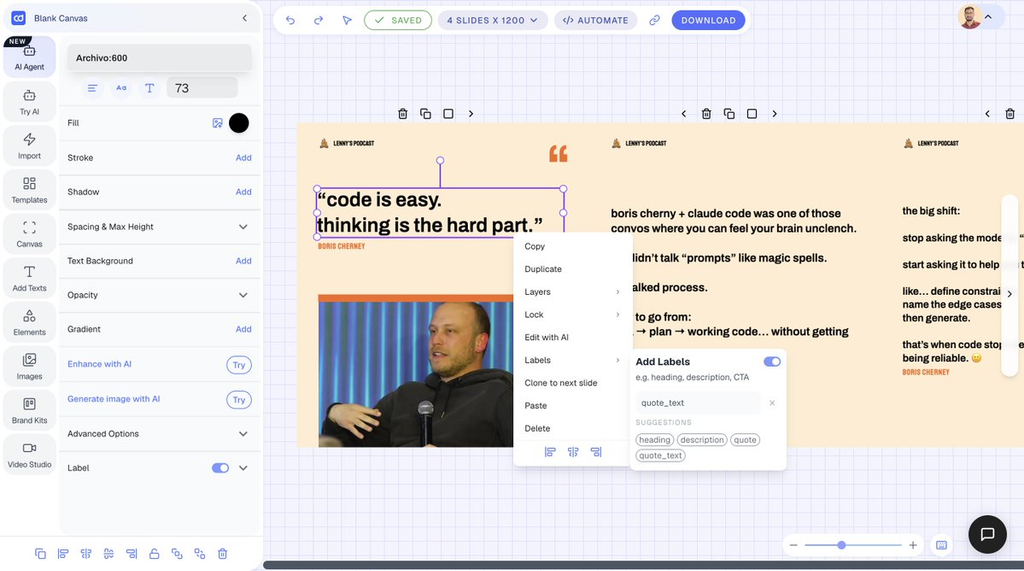
Inside Contentdrips, build two templates: a single-image quote template and a multi-slide carousel template. You can start from scratch or pull a starting point from the template library rather than building from a blank canvas.
Then:
- Assign dynamic labels to the elements that will change per episode, things like
quote_text,guest_name, andguest_photo. These labels are what let Grok Bot know exactly which field it’s filling when it pulls a new quote later. - Set max-height constraints on your text frames. Podcast quotes vary wildly in length, and without this, a long quote either overflows the frame or gets cut off. With it, Contentdrips automatically shrinks the font so every graphic looks intentional regardless of length.
- Save the Template IDs for both the single graphic and the carousel. You’ll reference these directly in every future prompt to Grok Bot.
Common mistake: skipping the max-height constraint. It’s the single most common reason a first batch of auto-generated graphics looks broken (text spilling off the edge of a slide), and it’s a one-time fix in the template, not something you fix per-episode.
Step 2: Upload Guest Headshots and Tag Them
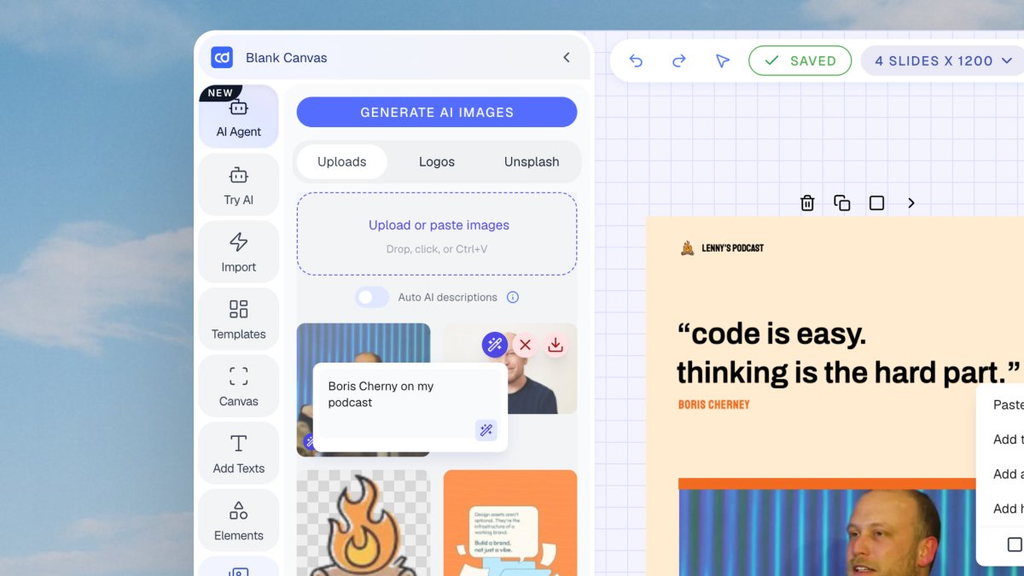
Upload your guests’ photos into your Contentdrips workspace media folder, and tag each one with the guest’s exact name, for example, “Boris.” This is a small step with a big payoff: once tagged, the AI can automatically match a quote to the correct guest photo without you manually attaching an image every time.
Step 3: Connect Your Contentdrips API Key to Grok Bot
During setup, Grok Bot will ask for an authorization token. Generate one from the Contentdrips API page under Settings > API Keys, then paste it into Grok Bot. That connection is what grants Grok Bot permission to populate your templates directly, with no manual copy-pasting between platforms.
If you want to see exactly which endpoints that key can call, or scope a key down to specific permissions before handing it to an automation, the full reference is at developer.contentdrips.com.
Step 4: Send a Podcast Link and Extract the Key Takeaways
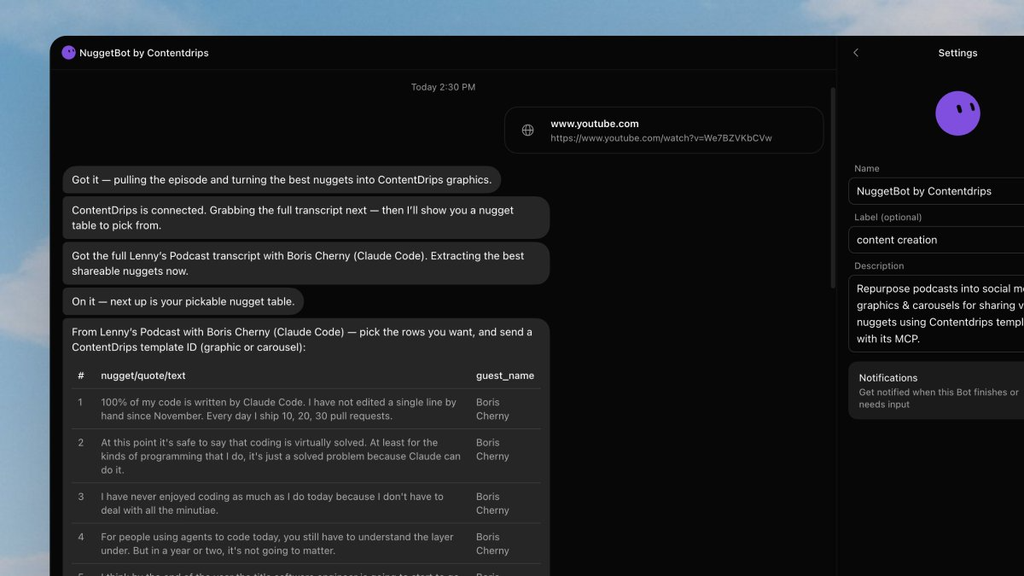
With everything connected, send a YouTube podcast link straight to Grok Bot in chat. It fetches the full transcript, works through the core discussion points, and hands back a bulleted list of the strongest takeaways, along with who said what.
This is the part that actually saves time. Instead of re-listening to an hour of audio hunting for one good quote, Grok Bot surfaces the candidates for you.
Step 5: Generate the Graphics and Carousels
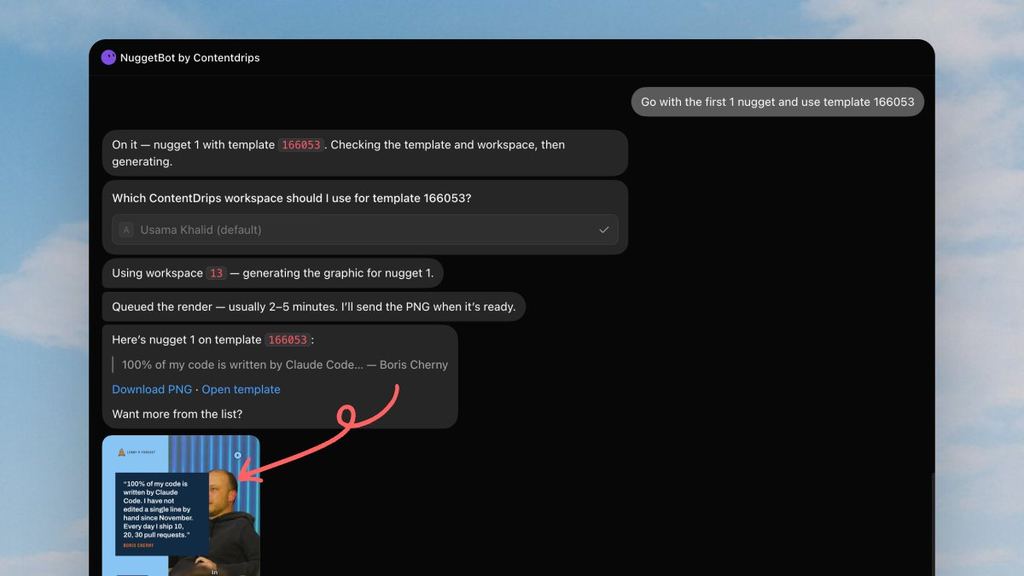
Once you have your list of takeaways (“nuggets”), respond with the nugget number and the template you want to use:
- For a single quote graphic: “Go with Nugget #1 using Template ID 16053”
- For a multi-slide carousel: “Use Nugget #3 with Template ID 16054 for carousel”
Grok Bot triggers Contentdrips through the API, replaces the text, adjusts the font to fit, matches the correct guest photo, and outputs a finished, high-resolution file. No manual design work at any point in this step.
If You Use Claude Instead of Grok Bot
This same workflow isn’t locked to one AI agent. If your team already works inside Claude rather than Grok Bot, Contentdrips connects the same way; see the guide to using Contentdrips with Claude for the equivalent setup.
Common Concerns About Using an AI Bot to Publish Your Social Content
Handing quote selection and design to a bot is a real shift in how a podcast’s content gets made, and it’s worth being honest about where that shift creates risk, not just where it saves time.
“Won’t the graphics sound off-brand or generic?” This is a real risk if you skip Step 1. The quality of the output is bounded by the quality of your template: Grok Bot fills in text and matches a photo, it doesn’t redesign your brand for you. Treat template design as a one-time investment worth getting right, not a step to rush through.
“What if it misquotes or misattributes a guest?” AI transcript summarization can compress or slightly reword what someone said, and a guest looking inaccurate in a public post is a real cost. Treat Grok Bot’s suggested “nuggets” as a shortlist, not a final draft. A quick human read of the exact quote against the source audio before it’s approved for a template is worth the extra thirty seconds, especially early on while you’re still trusting the workflow.
“Is it safe to give a bot my API key?” An API key is a real credential, and it’s worth treating it like one: store it the way you’d store any other production secret, and scope it to only what the automation needs rather than a master key. The API documentation is the place to check exactly what a given key can and can’t do before connecting it to anything automated.
“Will fully automated posting get my account flagged?” Most social platforms are more sensitive to unnaturally bursty, fully automated publishing cadences than to occasional, human-paced posting. This is a real reason to keep a human-approval checkpoint in the loop (see Step 5) rather than jumping straight to the fully hands-off version described below, at least until you’ve seen how your specific accounts behave.
“Do I need guest permission to turn their quote into a graphic?” Generally yes, in spirit if not always contractually. A guest agreed to be on your podcast, not necessarily to have their photo and a pulled quote auto-published across three platforms. Getting a guest’s general sign-off on repurposing when you book them (rather than asking permission per-graphic) is the simplest way to handle this without adding friction to the workflow.
“Doesn’t this get expensive?” API access requires Contentdrips Pro or Ultimate, on top of whatever your Grok Bot setup costs, so the workflow makes the most sense once you’re publishing consistently enough that the time saved clearly outweighs the subscription cost, not for a show that posts once a month.
“The ‘one hour of setup’ claim seems optimistic.” Labeling templates correctly, especially getting max-height constraints and dynamic fields right, is fiddly the first time. It’s a legitimately one-time cost, but budget more like an afternoon than sixty minutes if it’s your first time working inside Contentdrips’ template editor.
Advanced: Turn It Into a Fully Automated Content Engine
Once the manual version is working reliably, you can remove yourself from the loop almost entirely:
- Configure Grok Bot to check a specific YouTube channel or RSS feed daily.
- Have it automatically identify the highest-performing takeaway from any new episode.
- Connect Contentdrips directly to your LinkedIn, Instagram, and TikTok accounts so the finished graphics get scheduled and published without you touching anything.
At that point, every new episode you publish produces its own social content on its own, and the only work left on your end was the template you built once at the very beginning. Teams building custom versions of this pipeline, rather than relying on Grok Bot’s built-in connectors, will want the full Contentdrips developer documentation for the underlying endpoints.
Given the platform-flagging and no-human-review concerns above, most teams are better off keeping a lightweight approval step even at this stage, for example, a queue you glance at once a day, rather than going fully hands-off from day one.
Watch the Full Walkthrough
<iframe width=”560″ height=”315″ src=”https://www.youtube.com/embed/eD80v1Z630A” title=”Turn Podcast Into Social Media Graphics & Carousels With Grok Bot & Contentdrips” frameborder=”0″ allow=”accelerometer; autoplay; clipboard-write; encrypted-media; gyroscope; picture-in-picture; web-share” allowfullscreen></iframe>
FAQ
How does Grok Bot know which Contentdrips template to fill? You give it the Template ID directly when you make a request, for example, “use Template ID 16053.” Contentdrips stores each template’s dynamic fields (like quote_text and guest_photo), which the MCP connection uses to know exactly where to place the incoming content.
Can Grok Bot post the graphic directly to LinkedIn or Instagram? Yes, once you’ve connected your social accounts to Contentdrips and set up the automated version of this workflow, but most teams start with manual review before turning on fully automated publishing, for the platform-flagging and quality-control reasons above.
What if I don’t use Grok Bot, can I still automate this? Yes. The same result is achievable through the Contentdrips API directly, or through Contentdrips with Claude if that’s the assistant your team already uses.
Key Takeaways
- Grok Bot extracts takeaways from a podcast transcript and hands them to Contentdrips, which fills a pre-built template, no manual design work per episode.
- The one-time cost is template setup (Step 1); everything after that is a short chat exchange.
- The real risks are off-brand output, guest misquotes, and over-automation, all solvable with a human-review checkpoint until you trust the pipeline.
- The same workflow works with Claude instead of Grok Bot, or with a fully custom build against the Contentdrips API.
Want to see this running on your own account? Browse the Contentdrips template library to get started, or read the Grok Bot and API docs for the full setup.

Amna Anjum is an Associate at Contentdrips, working closely with the product and how creators use it day to day. She specializes in social content strategy, with deep knowledge of how carousels, graphics, and threads perform across Instagram, LinkedIn, Twitter, and TikTok. She writes from firsthand experience with the tools and workflows she covers.