
New Launch: Contentdrips MCP –Try for Free➜
Contentdrips Video Studio
Turn any carousel or graphic into a slide video or a looping GIF. Video Studio animates your text and images automatically, so the design you already made becomes a Reel, a TikTok or a LinkedIn GIF without a video editor.
VIDEO STUDIO
×Slide transition
Text animation
Image animation
Animation speed
Hooks that
stop the scroll
01
Open with a number
Save this for your next post
Trusted by 5,000+ creators
“Contentdrips saves me time on creating everyday LinkedIn posts. My favorite feature is turning content into carousels. I can repurpose my content for LinkedIn in a way that gets more reach.”
Svenja Rossig, Founder at SveniStudios
4
formats from one design: PNG, PDF, MP4, GIF
0
timelines, keyframes or editing software
How it works
Pick any template, open a design you already made, or describe a post and let the AI Design Agent build it on the canvas. Carousels and single graphics both work.
Click the Video Studio tab in the canvas sidebar, or choose Download MP4 / GIF. Your slides load straight into the preview.
Choose MP4 Auto, GIF Auto or MP4 Record Yourself. Set your animations, run a preview, then generate the file and post it.
Three modes
Every mode uses the same design and the same animation settings. Pick the one that fits where the post is going.
Best for Reels and TikTok
Auto-generates an MP4 from your slides with transitions, text and image animations, and optional background music. It is the fastest way to turn a carousel into a slide
Best for LinkedIn and X
Auto-generates a looping animated GIF. GIFs play on their own, loop without a tap, and stay light enough for posts, comments, DMs, newsletters and landing pages.
Best for personal brands
Record your webcam and voice on top of your slides while you walk people through them. A teleprompter keeps you on script and Back / Next buttons move the slides at your pace.
Automatic animation
Video Studio reads the layers in your design and animates each one for you. Pick a style once and it applies to every slide, so a 10 slide carousel takes the same effort as a single graphic.
Control how one slide hands off to the next.
NoneFade to WhiteFade to BlackDissolveSlide
Headlines and body text animate in on every slide.
FadeTypewriterWord by WordSlide UpSlide InZoom
Photos, logos and shapes get their own entrance.
FadeZoomPopSlide Up
Set the pace, then add a track to MP4 exports.
SlowNormalFastDurationBG music library
LinkedIn and X GIFs
A static quote card is easy to scroll past. The same card with its words appearing one by one, its stat popping in and its photo fading up gives people a reason to stop. GIF Auto does that to any single graphic or carousel, with no timeline to edit.
Your Name
Founder at Your Company · 1h
The one rule I follow before I hit publish on any post:
If it does not stop your thumb, it will not stop theirs.
@yourhandle
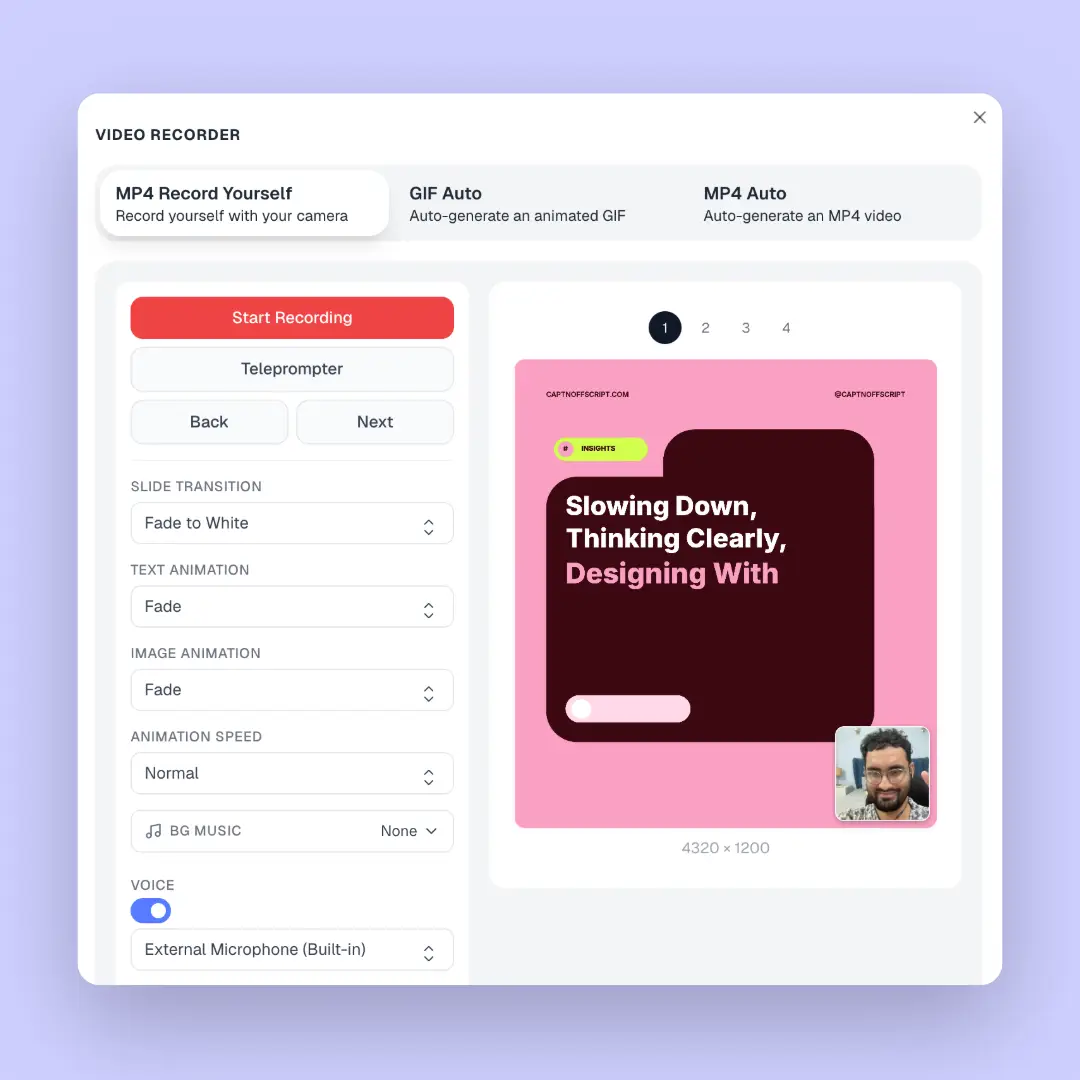
MP4 Record Yourself
Put your face next to your slides and talk people through them. It is the easiest way to turn a carousel into a video that feels personal, without a studio, a second camera or an editor.
Why it beats a video editor
Video Studio lives inside the editor your designs are already in, so there is nothing to export, import or rebuild.
The usual route
With Video Studio
Who it is for
Give your best carousel a second life. Repost it as a GIF or a short video and reach the people who scrolled past the PDF.
Turn carousels into Reels and TikToks with MP4 Auto, in the 4:5 or 9:16 size you already designed in.
Deliver a video version of every client carousel without opening a video editor or booking a motion designer.
Animate agent intros, listing posts and market updates into short videos. See more real estate social media post ideas.
Record yourself teaching over your slides for course clips, tutorials, webinars and lead magnets.
Turn feature announcements and changelog graphics into motion posts that stand out on launch day.
New: AI Design Agent
Describe the post you want in plain English. The AI Design Agent builds a fully editable carousel or graphic on your canvas, using your branding and saved style. When it looks right, open Video Studio from the same canvas and export it as an MP4 or GIF.
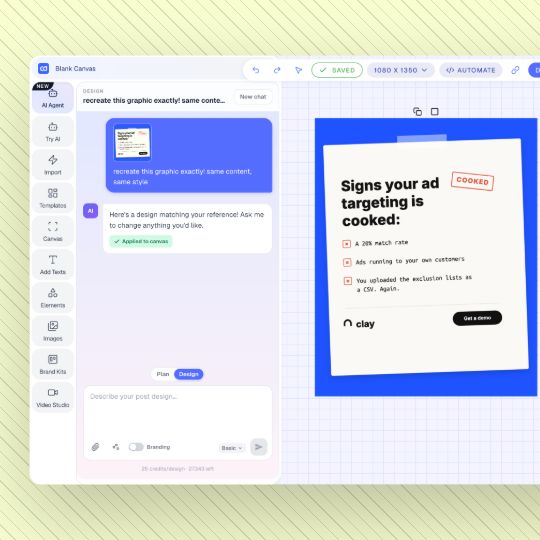
One workflow
Contentdrips is where your carousels already live. Video Studio means the video version is one tab away.
Send your MP4 or GIF straight to Make Post, write the caption with AI in your own voice, and keep everything in one draft.
Publish now or schedule to LinkedIn (personal profiles and company pages), Instagram and TikTok with the LinkedIn scheduler.
Export the same design as PNG, a PDF carousel, an MP4 and a GIF. One idea turns into four posts across your channels.
Trusted by 5,000+ creators
Plans
Design, edit and export still images on the free plan. The auto-animated GIF and MP4 modes sit on Pro, along with every social channel and unlimited brand profiles.
Free
Create designs, use templates and brand kits, and see how your carousel looks before you animate it. No credit card needed.
Pro
Unlock GIF Auto and MP4 Auto, publish to LinkedIn, Instagram and TikTok, run unlimited brand profiles and use the better AI design model.
Agencies and teams
Bulk-create carousels from a CSV, invite your team, and generate graphics programmatically with the Contentdrips API.
A carousel to video maker turns the slides of a carousel into a video. Each slide becomes a scene, with transitions between slides and animations on the text and images inside them. Contentdrips Video Studio does this right inside the design editor, so any carousel or graphic you make can be exported as an MP4 video or an animated GIF in a few clicks.
Open the carousel on the Contentdrips canvas, click the Video Studio tab and pick MP4 Auto. Choose a slide transition, a text animation, an image animation and a speed, click Run Preview to check it, then click Generate MP4. If you do not have a carousel yet, start with the LinkedIn carousel generator or a template.
Both modes animate your slides automatically. GIF Auto makes a silent, looping GIF that plays by itself in the feed, which makes it a great fit for LinkedIn, X (Twitter), email and Slack. MP4 Auto makes a video file and lets you add background music, which is what you want for Instagram Reels, TikTok and any platform that expects video.
Yes. Video Studio works on single graphics as well as carousels. Open a quote card, stat post or announcement graphic, choose GIF Auto, and the text and image layers animate in with the styles you pick.
Yes. LinkedIn supports GIFs in posts, and they play automatically as people scroll. That motion is why an animated version of a graphic tends to stand out next to static images in the feed. X (Twitter) plays GIFs automatically too.
Yes, export with MP4 Auto or MP4 Record Yourself. Instagram and TikTok expect video, and TikTok does not accept GIFs, so use MP4 for both. You can attach the MP4 to a post in Contentdrips and schedule it, or publish it from the TikTok carousel maker workflow.
Slide transitions: None, Fade to White, Fade to Black, Dissolve and Slide. Text animations: Fade, Typewriter, Word by Word, Slide Up, Slide In and Zoom. Image animations: Fade, Zoom, Pop and Slide Up. You can also set the animation speed and duration.
Yes. MP4 Record Yourself records your webcam and microphone on top of your slides. You can choose the webcam shape (square, landscape or portrait), drag it anywhere or snap it to a corner, change its size and corner radius, and move through slides with Back and Next while you record.
Yes. The teleprompter is a draggable overlay with an adjustable scroll speed. It can also generate a script for you with AI, so you can read your talking points while looking at the camera.
Yes. MP4 exports can use a track from the built-in background music library. GIFs are silent by nature, so music only applies to the MP4 modes.
The video keeps the size of your design. That means 1:1 square (1080 x 1080), 4:5 portrait (1080 x 1350), 9:16 story or TikTok (1080 x 1920) and 16:9 landscape (1920 x 1080) all work. Pick the size when you create the design and the export follows it.
No. There is no timeline, no keyframes and no editing software. You design the post like you normally would, pick your animation styles from a few dropdowns and generate the file.
You can start Contentdrips for free with no credit card. The auto-animated GIF and MP4 modes are part of the Pro plan. See the pricing page for what each plan includes.
Related tools
Create a carousel from a topic, blog or video in seconds, then animate it in Video Studio.
TikTok
Design 9:16 slides for TikTok, then export them as an MP4 slide video.
Make Instagram carousels with AI and turn your best ones into Reels.
Type a topic or paste a link. We design the carousel, you open Video Studio and export it as an MP4 or GIF.