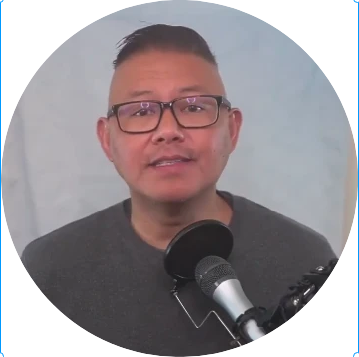
New Launch: AI Social Media Post Generator –Try for Free➜

LinkedIn Banner Maker

Create a standout LinkedIn banner in minutes using our LinkedIn Banner Maker. No design skills needed. Pick a template, customize it with AI, and download instantly.

4.9 from 11 reviews  ·  No sign-up required to browse
50+Free templates
1 clickTo open & edit
AIDesign agent
What Makes Contentdrips the Best LinkedIn Banner Maker?

Design a LinkedIn banner that actually gets noticed with tools built for speed, creativity, and your personal brand.

AI-Powered Design Assistance

Describe the banner you want and let AI generate a fully designed layout: typography, colors, and all. Your LinkedIn banner maker just got a whole lot smarter.

Customizable Templates for Every Industry

Browse professionally designed LinkedIn banner templates for creators, founders, marketers, consultants, and more. One click to open, seconds to make it yours.

Free AI Credits to Get Started

Use free AI credits to design your LinkedIn banner without spending a cent. No credit card, no commitment. Just a great-looking profile.

How to Make a LinkedIn Banner with Contentdrips

Three steps. No design experience needed. Your professional banner is closer than you think.

1. Choose a LinkedIn Banner Template

Browse our library of LinkedIn banner templates built for every profession and industry. Click one to open it instantly in the canvas editor.

2. Customize Your Text, Colors, and Images

Add your name, headline, brand colors, logo, or photo. Use the AI design agent to make copy or tweak the layout with a simple text prompt.

3. Preview and Download Your Banner

See exactly how your banner will look on LinkedIn before you export. Download in one click and upload it to your profile. Done.

LinkedIn banner size — the complete guide

Get your dimensions right so your design looks sharp on every device, every time.

Personal profile — recommended size 1584 × 396 px All Contentdrips templates are pre-built to this exact size — no resizing needed.
4:1 ratio

How your banner displays

Safe zone — always visible
Safe zone (keep text & logos here)
Mobile crop zone (avoid key content)
Profile photo overlap (bottom left)

Dimensions by profile type

Company page

Business or brand page

1128 × 191 px

6:1 ratio · JPG or PNG · max 8 MB

LinkedIn event

Event cover image

1600 × 900 px

16:9 ratio · JPG or PNG · max 8 MB

File requirements

FormatJPG or PNG
Max file size8 MB
Minimum width1192 px
Best export formatPNG for sharpness
Color modeRGB

Pre-download checklist

  • Banner is 1584 × 396 px
  • Key content stays in the center safe zone
  • Nothing critical in the bottom-left corner
  • File is under 8 MB
  • Exported as PNG for best quality

Everything You Need to Make a Great LinkedIn Banner

Contentdrips gives you the tools, templates, and AI to create a LinkedIn banner that looks like it was made by a professional designer, even if you’ve never designed anything before.

🎨

Hundreds of LinkedIn Banner Templates

Browse and choose from a large and growing library of LinkedIn banner templates — designed for creators, founders, consultants, marketers, and more.

🤖

AI-Powered Banner Design

Type what you want and let the AI design agent handle the rest. Generate a fully designed LinkedIn banner from a simple text prompt in seconds.

✏️

Full Customization Control

Edit every element of your banner: fonts, colors, text, images, and layout. Make it yours without touching a single line of code.

🖼️

Your Brand, Built In

Import your brand kit, logo, colors, fonts and apply it to any LinkedIn banner template in one click. Consistent branding, every time.

📐

Pre-Sized to LinkedIn Specs

Every template is built to the exact LinkedIn banner dimensions (1584 x 396 px) so your design always looks sharp and properly sized on your profile.

Instant Download, No Fuss

Export your finished LinkedIn banner in one click. Download it, upload it to LinkedIn, and you’re done. No watermarks, no waiting.

Make Your LinkedIn Profile Shine.
Start Free Today

Sign up to create your LinkedIn banner and unlock Contentdrips’ full suite of tools: carousel generators, AI post writers, profile tools, and more.

Loved by Personal Brands and Professionals

Don’t just take our word for it. Here’s what creators and marketers are saying about Contentdrips.

Connect With Us Today

Thousands have done it. Don’t miss out!  Book a demo now to create your standout professional presence and stay ahead with a polished, engaging profile.

Explore More Free LinkedIn Tools by Contentdrips

The LinkedIn Banner Maker is just the start. Use our free tools to build a complete, polished LinkedIn presence. No design experience needed.

Get In Touch With Us

Book a demo to see how Contentdrips’ tools, like content trends, can help you create better LinkedIn content!

Frequently Asked Questions About LinkedIn Banner Maker

Your LinkedIn banner, also called a background or cover photo, is the wide image at the top of your profile. It’s one of the first things visitors see, making it a prime space to communicate your brand, your role, or what you stand for. A well-designed banner can dramatically increase profile credibility and connection requests.

Yes. Contentdrips offers a free LinkedIn banner maker with AI-powered design tools and a library of customizable templates. You can browse templates, open them in the editor, and customize them without any upfront payment.

The most effective LinkedIn banners include your name or tagline, your role or area of expertise, your brand colors or logo, and a clear call-to-action (like “Let’s connect” or your website). Keep the design clean and focused — less is more.

The recommended LinkedIn banner size is 1584 x 396 pixels. Contentdrips’ templates are pre-sized to these exact dimensions, so your banner will look pixel-perfect when uploaded to LinkedIn.

Absolutely. Contentdrips offers a growing library of LinkedIn banner templates designed for different industries, styles, and personal brand goals. Click any template on this page to start customizing it instantly.

Yes. LinkedIn crops the left and right edges of your banner on mobile devices. To make sure nothing important gets cut off, keep your key content (text, logo, photo) centered within the banner. Contentdrips’ templates are designed with this in mind.

our LinkedIn banner should include your name or brand, a clear value proposition or tagline that explains what you do, and a subtle call-to-action (like “Connect with me” or your website URL). If you’re a professional, add your job title and a relevant visual that reflects your industry. Keep it uncluttered as one strong message is more memorable than five competing ones.

Yes. Company pages on LinkedIn support banner images just like personal profiles. The recommended size is 1128 × 191 pixels for company pages (vs. 1584 × 396 px for personal profiles). Use your company banner to reinforce your brand identity, highlight a product, campaign, or tagline, and make a strong first impression on anyone who visits your page.

There’s no fixed rule, but updating your banner every 3–6 months is a good practice. You might refresh it when you change roles, launch a new product or service, rebrand, or simply want to keep your profile feeling current. A fresh banner also gives your existing connections a reason to revisit your profile.

Absolutely. With Contentdrips, you can import your brand kit, including your logo, colors, and fonts, and apply it to any LinkedIn banner template in one click. This ensures your banner stays consistent with the rest of your brand presence across other platforms.

Yes, they’re the same thing. LinkedIn uses different terms in different places — “background photo,” “cover photo,” and “banner” all refer to the wide image that appears at the top of your profile, behind your profile picture. Whatever you call it, the recommended dimensions are 1584 × 396 pixels and it’s one of the first things visitors notice when they land on your profile.