
New Launch: Contentdrips MCP –Try for Free➜
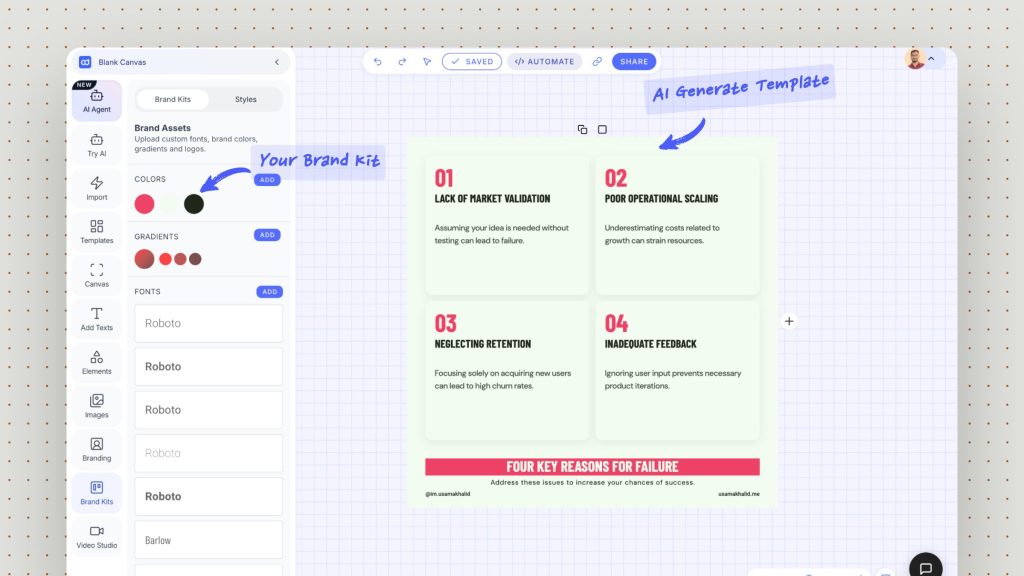
Upload your fonts, colors, gradients, and logos once. Contentdrips applies them to every carousel, graphic, and post you create, so everything you publish stays on-brand without manual restyling.
WHAT’S INSIDE
A brand kit is the central hub for your visual identity. Contentdrips stores each element so any post you make pulls from the same source of truth.
Upload the typefaces you use for headings and body text. Your posts render in your real brand fonts, not generic defaults.
Save your exact brand colors with their hex values. Apply primary and accent colors to any design in one click.
Store the gradient fills your brand uses for backgrounds and accents, ready to drop into carousels and graphics.
Keep every logo variation on hand, including transparent and alternate versions, so the right mark is always available.
THE DIFFERENCE
Most tools store your brand assets in a folder you apply by hand. In Contentdrips, your brand kit feeds every creation engine automatically, so on-brand is the default, not an extra step.
Bulk CSV
Upload a spreadsheet and generate hundreds of carousels or graphics at once. Every row comes out wearing your fonts, colors, and logo, with no per-post restyling. Built for agencies running volume.
API
Pass branding straight into the Contentdrips API. Generate graphics from any workflow or app and have your brand applied to every render automatically.
AI Design Agent
Turn on the Use Brand Kit toggle and the AI Design Agent applies your saved fonts, colors, and styles to its next generation, so AI-designed posts match your identity from the start.
WHO IT’S FOR
Agencies & Teams
Keep a separate brand kit for each client and switch between them per workspace. New posts, bulk batches, and API renders all stay on the correct brand, so nobody ships a carousel in the wrong colors. Onboard a new client by uploading their kit once.
Solo Creators
Set your fonts, colors, and logo once and every post you publish looks unmistakably yours. Consistency is what makes a personal brand recognizable, and your brand kit makes it effortless across LinkedIn and Instagram.
HOW IT WORKS
Add your fonts, brand colors, gradients, and logo files. Import your existing brand kit or build one from scratch in minutes.
Your kit lives in your workspace, reusable across every template, post, and bulk job. Agencies keep one kit per client.
Make a carousel, run a CSV batch, call the API, or prompt the AI Design Agent. Your branding applies automatically every time.
A brand kit in Contentdrips is a saved collection of your brand’s visual identity: your fonts, color palette, gradients, and logos. Once uploaded, it is applied to the carousels, graphics, and posts you create, so your content stays consistent and on-brand without restyling each design by hand.
You can store your brand fonts, your color palette with exact hex values, your gradient fills, and all of your logo variations. These assets become available across the editor, bulk generation, the API, and the AI Design Agent.
Yes. When you upload a CSV to generate posts in bulk, every generated carousel or graphic uses your saved brand kit. This lets agencies produce hundreds of on-brand posts at once without restyling each one.
Yes. Enable the Use Brand Kit toggle in the AI Design Agent and it will apply your saved fonts, colors, and styles to its next generation, so AI-designed posts match your brand identity from the start.
Yes. You can keep a separate brand kit per workspace, which is ideal for agencies and teams managing several clients. Switch workspaces to apply the right brand to your designs, bulk jobs, and posts.
Yes. You upload your own fonts and enter your own brand colors and gradients. Contentdrips uses your real brand assets rather than generic defaults, so your output looks like you.
Contentdrips offers a free plan with no credit card required. Some branding capabilities are part of paid plans. You can start for free and upgrade as your branding and volume needs grow.
Yes. Your brand kit applies to content for both LinkedIn and Instagram, and you can publish or schedule directly to either platform from Contentdrips.
Upload your brand kit once and let Contentdrips keep every carousel, graphic, and post on-brand. Start free, no credit card required.