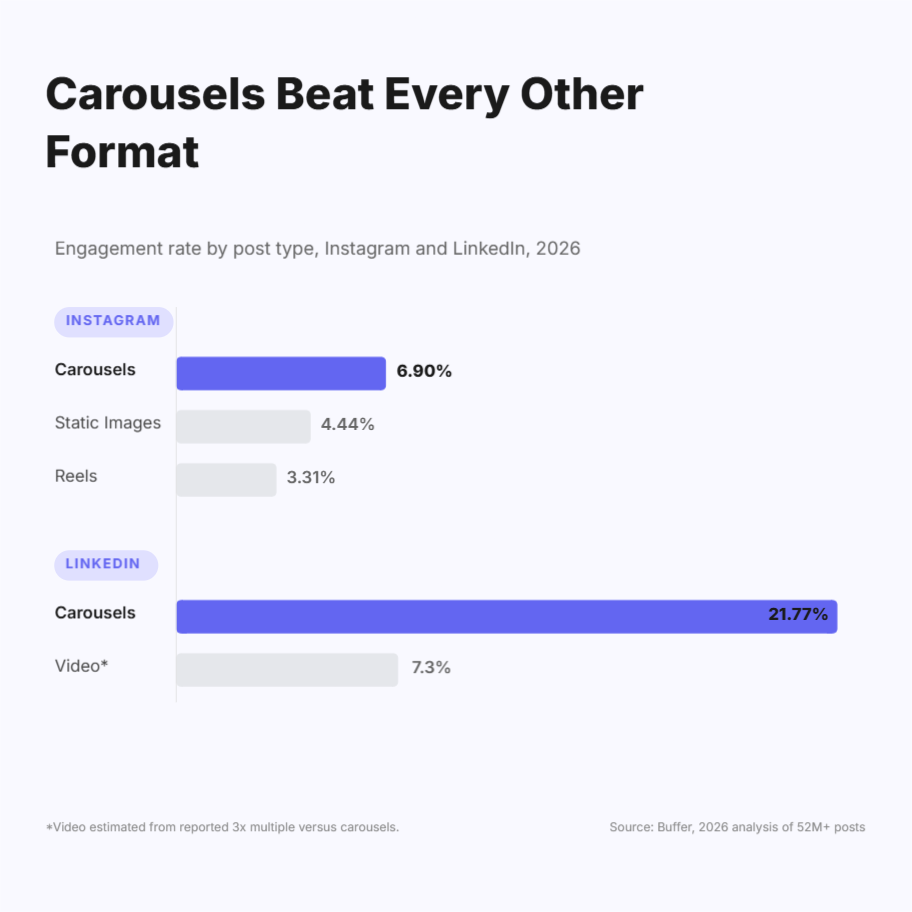
Choosing the right carousel tools for real estate agents comes down to one tradeoff: speed versus looking like every other agent in your market. The tools worth your time in 2026 are Canva, Coffee & Contracts, Agent Crate, PostNitro, Adobe Express, and Contentdrips. A 2026 analysis of over 52 million posts found carousels earning roughly 109% more engagement than Reels on Instagram, and on LinkedIn carousels reached a median engagement rate of 21.77%, about three times that of video. If you’re not building carousels for your listings yet, this is the format leaving the most reach on the table.
This guide is for agents and small teams posting listings regularly, not enterprise brokerage marketing departments with a dedicated designer on staff.
The problem isn’t really “carousels take too long”
That’s the surface complaint, but it’s not the whole story.
Myth: Buying a real-estate-specific template subscription solves the time problem. Fact: It trades one problem for another. Template subscriptions get you speed, but agents using cookie-cutter, done-for-you templates risk their content looking generic and interchangeable with every other agent in the same market, which undercuts the entire point of posting under your own name.
The mistake most agents make: picking a tool based on how many templates it has, instead of how fast they can go from “new listing” to “published, on-brand post.” Template count feels like the thing to optimize for, but agents already keep a small library of saved templates specifically so they don’t have to search a massive library every time they start a new design. Volume isn’t the bottleneck; repeatable speed is.
What to Look for in Carousel Tools for Real Estate Agents
Before naming a single tool, here’s the framework carousel tools for real estate agents should be judged against:
- Bulk or batch generation. Can it turn five new listings into five branded carousels in one pass, or is it strictly one slide, one listing, at a time?
- Brand consistency without genericness. Does your logo, colors, and fonts apply automatically, without every post looking identical to a template thousands of other agents also bought? A proper brand kit setup is what makes this possible: set it once, and it should carry through every carousel you generate afterward.
- Correct dimensions, automatically. Instagram and Facebook carousels need the right pixel dimensions; getting this wrong costs cropped photos and a sloppy feed.
- Photo-heavy layout support. A listing carousel is 5-10 property photos plus price and details, not a text-heavy B2B slide deck. The tool needs to handle images as the main event, not an afterthought.
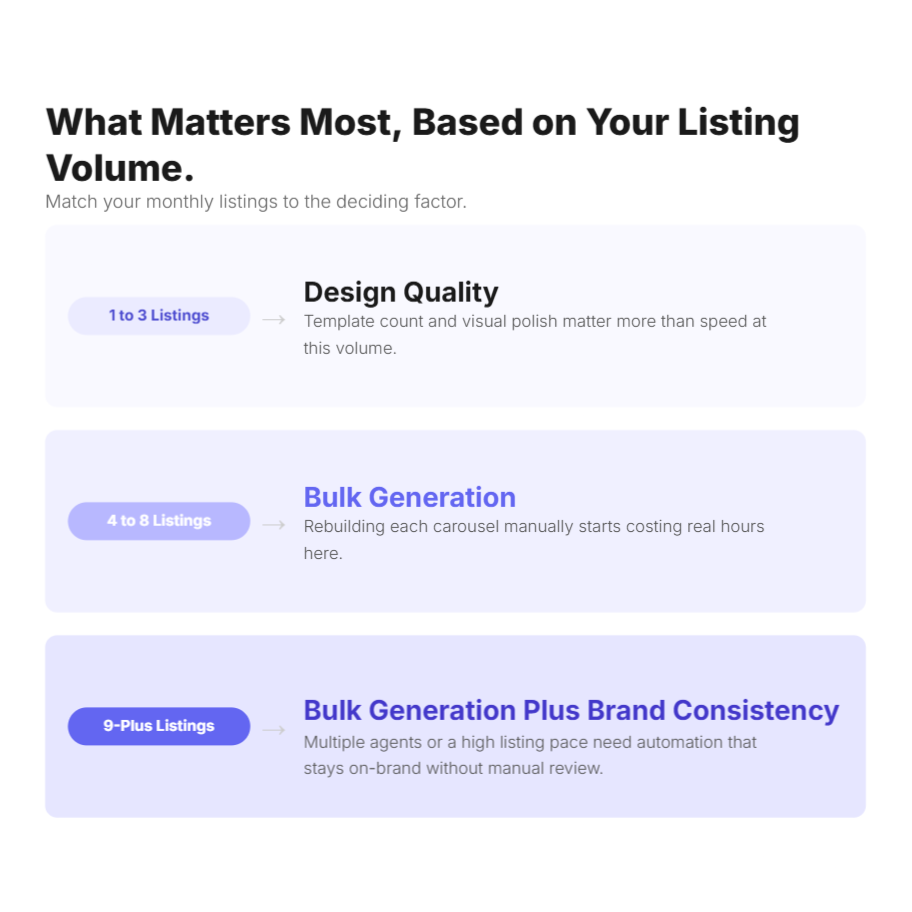
If you list more than roughly four properties a month, bulk generation matters more to your workflow than template count ever will.
One honesty check before the numbers: don’t chase a borrowed real-estate benchmark. Two major analytics vendors report wildly different real estate Instagram engagement rates: one puts it at 3.70%, another at 0.30%, a 12x gap on the same platform, with neither disclosing sample size. Real estate-specific benchmarks are unreliable enough that comparing your account to an industry average is close to meaningless. Carousels win as a format broadly; track your own account’s numbers over time instead of chasing someone else’s.
Methodology
Six carousel tools for real estate agents were evaluated against the framework above: bulk/batch capability, brand-kit automation, platform-correct export dimensions, and how they handle photo-heavy real estate content specifically. Pricing reflects entry-level paid tiers as of mid-2026; free tiers are noted where they exist.
At a glance
| Tool | Best for | Bulk/batch | RE-specific templates | Starting price | Standout con |
|---|---|---|---|---|---|
| Canva | Agents who want maximum design control | Limited (not carousel-built) | No (general library) | Free / $10-15/mo | Manual, slide-by-slide; no listing-to-carousel automation |
| Coffee & Contracts | Solo agents who want strategy + templates, not just design | No | Yes, real-estate-native | Subscription, tiered | Still hand-edited per listing in Canva |
| Agent Crate | Agents who want done-for-you and auto-posting | No | Yes | Subscription, tiered | Templates risk looking identical to competing agents |
| PostNitro | Agents comfortable with a generic AI carousel tool | Limited | No | Free tier / paid plans | Not built for real estate; templates need rework |
| Adobe Express | Agents already in the Adobe ecosystem | Limited | Some (via Adobe’s template marketplace) | Free / paid | Carousel-specific workflow is weaker than dedicated tools |
| Contentdrips | Agents/teams who want AI-built carousels fast, with real batch capacity | Yes (CSV bulk generation) | No out-of-the-box RE templates | Free plan / $15/mo+ | Purpose-built for LinkedIn + Instagram only, not a general design tool |
The tools, in detail
Canva
Best for: agents who want full manual design control and already have a template library they trust.
- Pros: Massive template and asset library; drag-and-drop is genuinely easy for non-designers; brand kit keeps colors/fonts/logo consistent once set up; generous free tier.
- Cons: No listing-to-carousel automation, every new listing is a fresh manual build; searching a library that large gets slower over time, not faster; bulk creation exists but wasn’t designed for carousel output specifically.
Coffee & Contracts
Best for: solo agents or boutique brokerages who want a content strategy, not just blank templates.
- Pros: Real-estate-specific content calendar, captions, and templates delivered monthly; templates connect directly to Canva for editing; strong community and training resources for newer agents.
- Cons: No bulk generation, each listing still needs manual photo and detail swaps in Canva; doesn’t support platforms outside Instagram-first workflows well; ongoing subscription cost even in slow listing months.
Agent Crate
Best for: agents who want the design work fully done for them, including auto-posting.
- Pros: Done-for-you templates across posts, stories, and reels; automated posting removes a manual step; consistent, polished output without touching a design tool.
- Cons: The lack of personalization and cookie-cutter templates create real risk of your content looking indistinguishable from other agents using the same service, especially in a saturated local market; limited platform support beyond core social channels; less control if you want to deviate from provided templates.
PostNitro
Best for: agents who want AI-generated carousels and don’t need real-estate-specific structure.
- Pros: AI handles both copy and layout from a topic, URL, or text; supports Instagram, LinkedIn, TikTok, and more from one tool; solid free tier to test before paying.
- Cons: Not built with real estate listings in mind, templates need manual rework to fit property details cleanly; general-purpose AI carousel structure, not tuned for photo-heavy listing content.
Adobe Express
Best for: agents who already use Adobe products and want one ecosystem.
- Pros: Quick templates, some real-estate options via Adobe’s marketplace; integrates with other Adobe tools if you use them; free tier available.
- Cons: Carousel-specific workflow is noticeably thinner than dedicated carousel tools; no batch/bulk path for multiple listings; less community-driven real estate template support than Canva or Coffee & Contracts.
Contentdrips
Best for: agents or small teams who want carousels built from a plain description, with real batch capacity for multiple listings. Contentdrips also works as a real estate social media post maker for listing carousels and related posts.
- Pros: The AI Design Agent builds a full carousel, layout, copy, and images, from a plain-text description of the listing; a brand kit (logo, colors, fonts) applies automatically to every carousel once set up; CSV bulk generation turns a spreadsheet of listings into a batch of branded carousels in one pass, which matters directly once you’re listing more than a handful of properties a month; free plan available, no credit card required to start.
- Cons: Not real-estate-template-specific out of the box, you’re not getting “Just Listed” or “Open House” templates pre-built the way Coffee & Contracts offers; purpose-built for LinkedIn and Instagram only, so if your workflow spans TikTok or other platforms with different visual requirements, you’ll want something else alongside it.
Verdict
- Solo agent, fewer than 3-4 listings a month: Coffee & Contracts if you want strategy and captions bundled with design, or Canva if you’re comfortable building it yourself.
- Solo or small-team agent listing regularly, tired of rebuilding from scratch: Contentdrips. Describe the listing, get a branded carousel, without hand-editing every slide.
- Small brokerage or team managing multiple agents’ listings at once: Contentdrips, specifically for the CSV bulk generation and per-brand-kit consistency across agents.
- Agent who wants zero involvement in content creation: Agent Crate, with eyes open to the genericness trade-off.
Getting started with Contentdrips
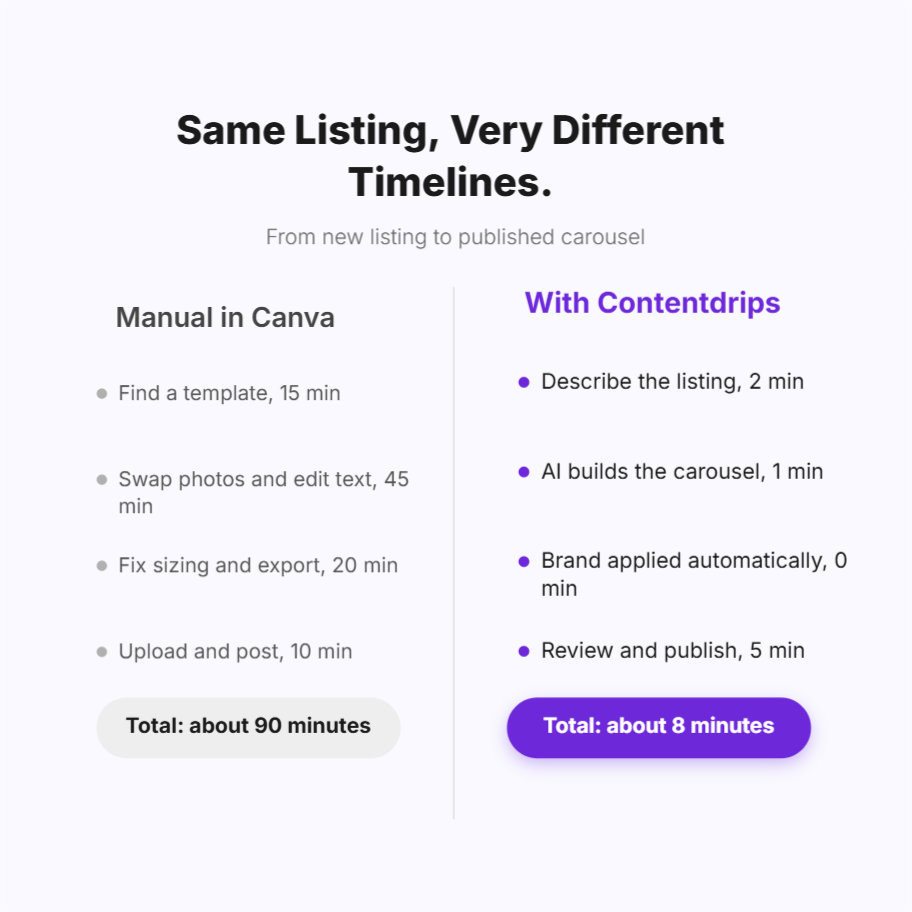
If the batch-generation and brand-consistency case above fits how you work, here’s the fastest path in:
- Start free at the Instagram Carousel Maker: no credit card required, and you can test the AI carousel workflow immediately on your next listing.
- Set up your brand kit once: logo, brand colors, and fonts, so every carousel you generate afterward applies them automatically instead of you re-styling each one.
- Describe your first listing in plain text: address, price, standout features, photos, and let the AI carousel generator build the layout and copy. Prefer to start from a design? Browse the free Instagram carousel templates or LinkedIn carousel templates instead, and let AI fill in the content.
- Review, tweak, and export or publish directly to Instagram or LinkedIn: no separate scheduling tool needed for a single post.
If you’re listing regularly or managing more than one agent’s content: skip the one-at-a-time flow. Prepare a simple spreadsheet, one row per listing, and use the CSV bulk generation path to get a full batch of branded carousels back at once; the Contentdrips vs. Canva for agencies breakdown walks through exactly how that works for teams managing multiple brand profiles. Already have listing data flowing through an MLS feed or CRM? The app vs. API guide explains when it’s worth automating that pipeline directly rather than uploading a CSV by hand.
Want the fastest possible first test, with no signup at all? Paste any listing description into the free text-to-carousel tool and see the output before creating an account. And if you’re coming from Canva and want the direct comparison first, the Canva alternative breakdown lays out exactly what changes.
Explore the full platform at contentdrips.com.
Frequently asked questions
What’s the best free carousel maker for real estate listings? Canva’s free tier and Contentdrips’ free plan are both genuinely usable without paying. Canva gives you more raw template variety; Contentdrips gives you AI-generated carousels from a plain-text listing description and a brand kit, both on the free tier, with no credit card required.
Can I bulk-create carousels for multiple listings at once? Yes, with the right tool. Canva and most template-subscription services require one manual build per listing. Contentdrips supports CSV bulk generation: upload one row per listing and get a branded carousel back for each, which matters once you’re listing more than a handful of properties a month.
Do real estate-specific templates perform better than general design tools? Not automatically. Real-estate-specific template services save setup time, but if many agents in your market use the same service, your content risks looking interchangeable with theirs. A tool that applies your own brand kit automatically to AI-generated layouts avoids that risk without sacrificing speed.
What image dimensions should a real estate Instagram carousel use? 1080×1080px (square, 1:1) or 1080×1350px (portrait, 4:5). Portrait takes up more vertical feed space and is the standard recommendation for maximum reach; most dedicated carousel tools, including Contentdrips and Canva, size templates correctly by default.
Is it worth using a carousel tool built for LinkedIn if I only post on Instagram? Only if it also covers Instagram well. Tools built exclusively for one platform, like LinkedIn-only carousel makers, won’t help your Instagram listing posts. Contentdrips covers both from one workspace, which matters if you use LinkedIn for referral networking alongside Instagram for listings.
Summary
- Carousels significantly outperform other post formats for engagement, but real estate-specific engagement benchmarks vary too widely across sources to be trustworthy; track your own numbers instead.
- The real tension in choosing a tool is speed versus looking like every other agent’s cookie-cutter template, not just “how fast can I build one carousel.”
- Bulk/batch generation matters more than template count once you’re listing more than roughly four properties a month.
- Contentdrips fits agents and teams who want AI-built, on-brand carousels with real batch capacity, but isn’t a fit if you need real-estate-native templates out of the box or coverage beyond LinkedIn and Instagram.
- Coffee & Contracts and Agent Crate solve for real-estate-specific content but trade away automation and, in Agent Crate’s case, some brand distinctiveness.

Amna Anjum is an Associate at Contentdrips, working closely with the product and how creators use it day to day. She specializes in social content strategy, with deep knowledge of how carousels, graphics, and threads perform across Instagram, LinkedIn, Twitter, and TikTok. She writes from firsthand experience with the tools and workflows she covers.