Instagram carousel posts — also called swipe posts or multi-image posts — are the highest-engaging format on the platform. This guide shows you how to create one from scratch, design it well, and make it worth swiping through.
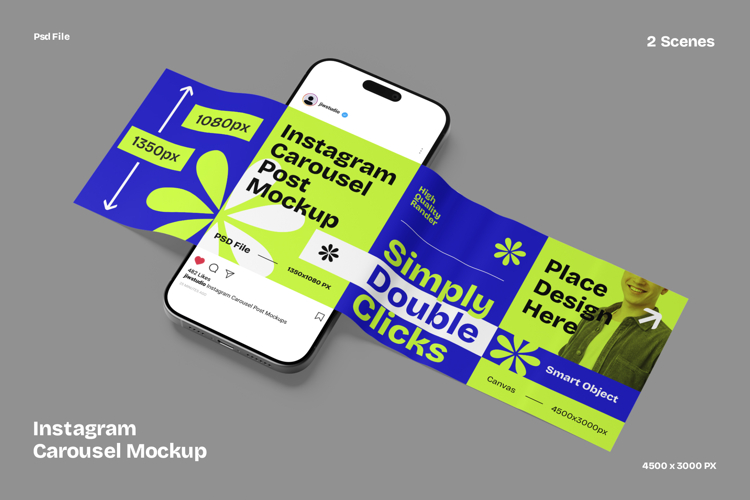
What Is an Instagram Carousel Post?
An Instagram carousel post (also called a swipe post, slide post, or multi-image post) is a single Instagram post that contains between 2 and 20 photos, videos, or a mix of both. Followers swipe left to move through the slides, just like flipping through a book.
Carousel posts show up in the feed exactly like regular posts. The only visual difference is a small dot indicator at the bottom of the image showing how many slides are in the post.
What you can include in an Instagram carousel:
- Photos (JPG or PNG)
- Videos (up to 60 seconds each)
- A mix of photos and videos
- Designed graphics or text slides
- Infographic-style educational content
Instagram introduced carousels in 2017 and they have become the dominant format for creators and brands who want to share more than a single image can hold.
Why Carousel Posts Outperform Everything Else on Instagram
Before getting into how to create one, here is why the effort is worth it.
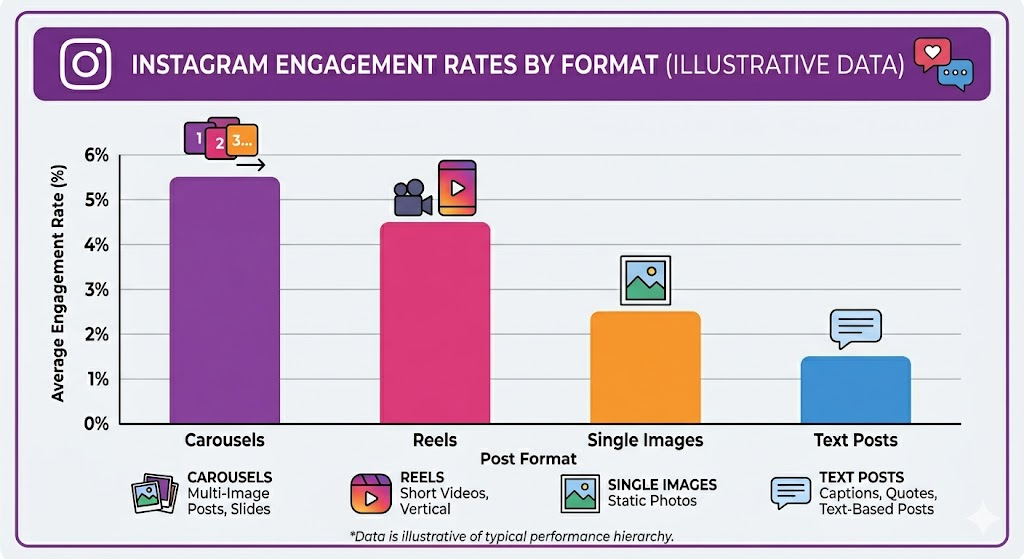
Carousels generate up to 3x more engagement than single-image posts on Instagram, according to SocialInsider’s 2025 benchmark data. The reason is simple: the algorithm measures how long someone spends on a post. Swiping through 8 slides takes 10 to 20 seconds. Glancing at a single image takes one second. Longer time on post means more distribution.
There is also a second-chance mechanic. Instagram’s algorithm re-shows a carousel post to the same user but starting on a different slide if they did not engage the first time. This means your carousel gets multiple shots at the same audience — something no other post format offers.
Key data points:
- Carousels have an average engagement rate of 5.13%, versus 1.9% for single images
- Posts with 10 slides get the most reach, on average
- Carousels with a text-based first slide get 56% more saves than photo-only carousels
- Educational carousel posts are saved at 4x the rate of personal photo posts
Instagram Carousel Specs and Sizes (2026)
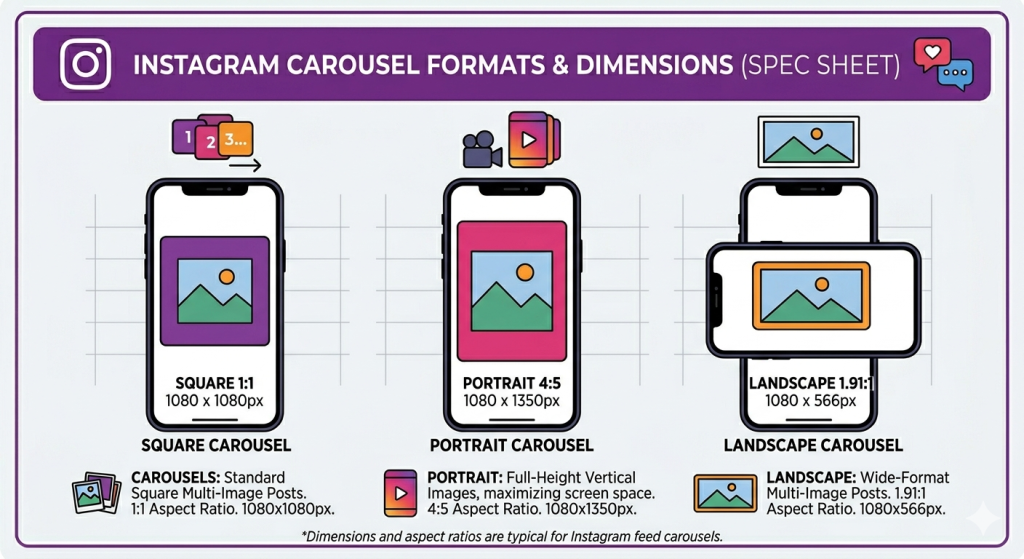
Correct Instagram carousel size matters. Get the dimensions wrong and your carousel will be cropped, blurry, or incorrectly formatted when posted.
Recommended Dimensions
| Format | Dimensions | Best For |
|---|---|---|
| Square | 1080 x 1080 px | Universal, cleanest feed appearance |
| Portrait (recommended) | 1080 x 1350 px | Maximum screen real estate on mobile |
| Landscape | 1080 x 566 px | Photography, panoramic content |
Portrait 1080 x 1350 px is the recommended format for 2026. It fills significantly more of the phone screen than square, increasing dwell time and swipe-through rate. The trade-off is a slightly taller grid appearance on your profile.
Important Rules
- All slides must use the same aspect ratio. Instagram will crop or reformat your carousel if slides are mixed sizes. Design all slides in one consistent format.
- Maximum file size: 30MB per image, 4GB per video
- Minimum resolution: 320 x 320 px (always use the recommended sizes above)
- Maximum slides: 20 (as of 2026 update — up from the previous limit of 10)
- Video length per slide: Up to 60 seconds
- Accepted file types: JPG, PNG for images; MP4, MOV for videos
Font Size Minimums for Readability
| Text Element | Minimum Size | Recommended Size |
|---|---|---|
| Heading / Hook text | 60px | 80px |
| Subheading | 40px | 55px |
| Body / paragraph text | 35px | 45px |
Never go below 35px for any text on Instagram carousel slides. Anything smaller renders unreadably small on a phone screen — which is where over 90% of Instagram is consumed.
How to Create a Carousel Post on Instagram: Step by Step
There are two ways to create and post a carousel on Instagram. Method 1 is posting directly within the Instagram app using photos already on your phone. Method 2 is designing your carousel with a tool like Contentdrips and uploading the finished slides.
Method 1: Create a Carousel Directly in the Instagram App
This method works best for photo carousels — personal photos, behind-the-scenes content, event recaps, or travel posts.
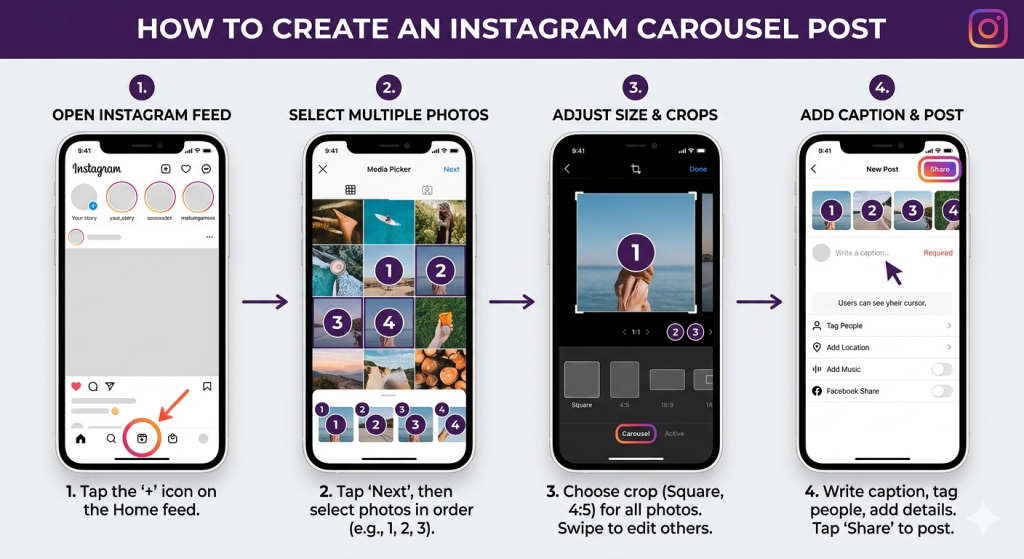
Step 1: Tap the create button Open Instagram. Tap the + button at the bottom center of the screen.
Step 2: Select multiple photos or videos Tap the stacked squares icon in the bottom left corner of the media picker. This activates multi-select mode. Tap each photo or video you want to include. Blue numbered circles appear showing the slide order.
Instagram allows up to 20 slides per carousel post.
Step 3: Arrange your slides Your slides will appear in the order you selected them. To reorder: long-press a slide thumbnail at the top of the screen and drag it to the position you want.
Step 4: Choose your crop format Tap the expand/crop icon on the first slide to choose between square, portrait, or original format. Whatever format you choose applies to all slides. Select Original if your images are already sized at 1080 x 1350px.
Step 5: Apply filters (optional) Swipe left through the filter options. Applying the same filter to all slides keeps visual consistency. Tap Edit for more granular adjustments.
Step 6: Add your caption Write a compelling caption. Tag accounts, add location, and include a call to action. Optimal Instagram caption length for carousels is 138 to 150 characters for the visible portion, with the full caption running 300 to 500 characters.
Step 7: Share Tap Share and your carousel is live.
Method 2: Design a Carousel with Contentdrips and Upload
This method works best for designed carousels — educational content, quote cards, infographics, product showcases, and branded content. This is what most professional creators and brands use.
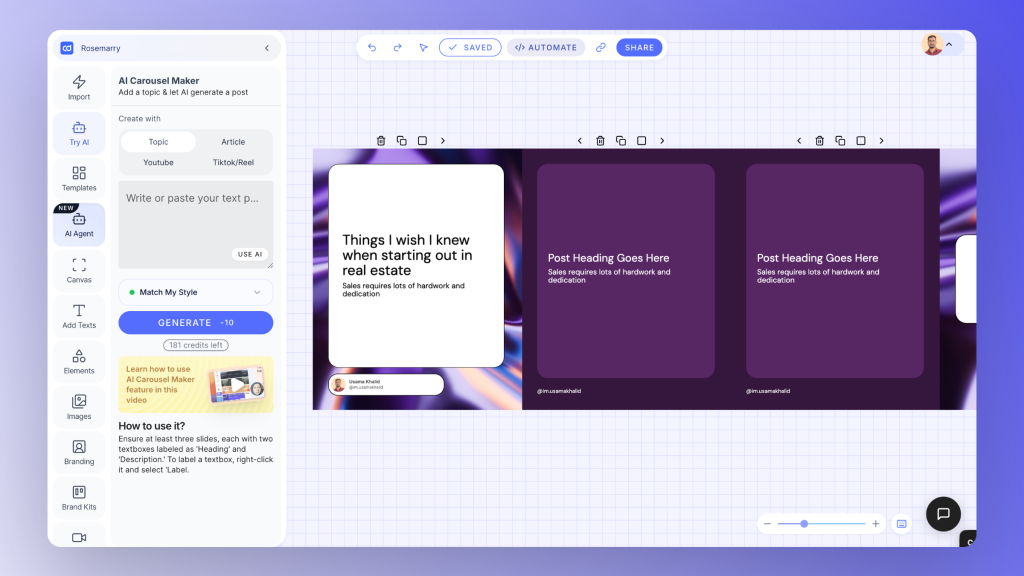
Step 1: Choose a template or start from scratch Open Contentdrips and go to Templates. Filter by Instagram Carousel. Pick a template that fits your content type or start from a blank canvas. All templates are sized correctly for Instagram at 1080 x 1350 px.
Step 2: Write your slide copy first Before designing, write the text for every slide in a simple list. Knowing exactly what each slide says before you design it saves significant time.
Step 3: Edit your template Replace the placeholder text with your copy. Apply your brand kit (fonts, colors, logo). Adjust layouts, add icons, upload images as needed. The canvas editor works exactly like familiar design tools — click, drag, type.
Step 4: Export as PNG Click Export and select PNG. Contentdrips packages your slides into a zip file. Download and extract the zip — you will have individually numbered PNG files for each slide.
Step 5: Upload to Instagram Go to Instagram. Tap the + button, select all your PNG slides in order, and follow the same steps from Method 1 (Step 4 onward).
Pro tip: Rename your files with a number prefix (01-slide, 02-slide, etc.) before uploading to ensure Instagram keeps them in order.
10 Types of Instagram Carousel Posts (With Ideas for Each)
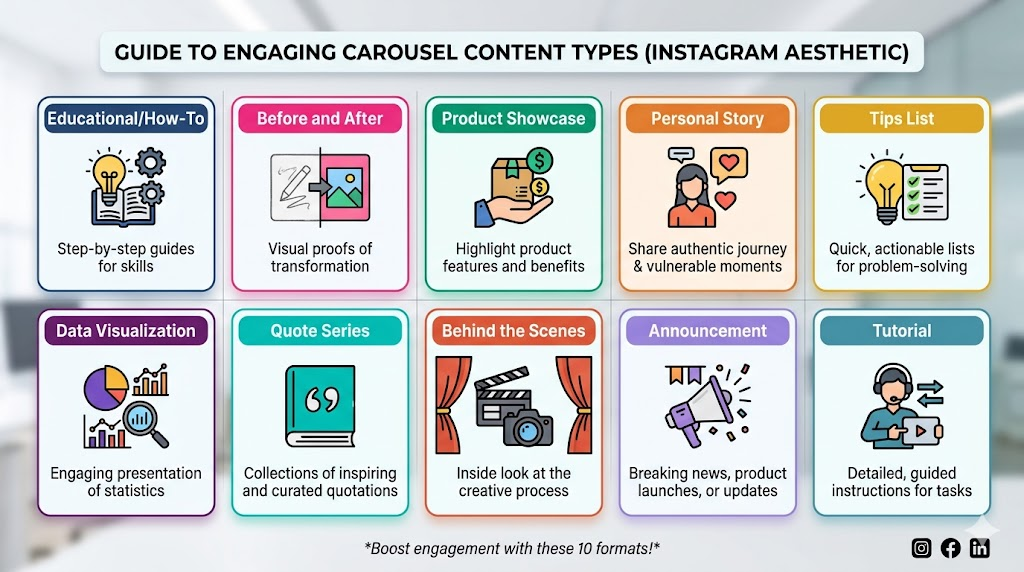
Understanding which type of carousel to create is as important as knowing how to build one. Here are the 10 most effective formats with ideas for each.
1. Educational / Informative Carousel
The highest-saving format on Instagram. These are carousels that teach something specific and useful — and because they are reference material, people save them to come back to later.
What works:
- “5 things to know before [experience]”
- “The difference between X and Y, explained simply”
- Industry-specific facts most people get wrong
- Step-by-step skill breakdowns
Structure: Hook slide (bold claim or question) → 5 to 8 teaching slides (one point each) → Summary or takeaway slide → CTA
Example: “5 things your doctor won’t tell you about sleep (but the science does)”
2. How-To Tutorial Carousel
Walk your audience through a specific process, step by step. These perform well because the format perfectly matches the intent — someone wants to learn how to do something, and a carousel provides a visual step-by-step guide.
What works:
- How to make / build / fix / create something specific
- Behind the process for a skill you have
- The exact steps you use for a recurring task
Structure: Hook (the outcome) → Step 1 through Step N (one per slide) → Result → CTA
Example: “How I write a week’s worth of Instagram content in 45 minutes”
3. Before and After Carousel
Show a transformation. These stop the scroll because the gap between before and after creates immediate curiosity. The reveal is satisfying.
What works:
- Physical transformations (fitness, home renovation, design makeovers)
- Career or skill development over time
- Content or copy rewrites (before/after the edit)
- Product demonstrations
Structure: Hook (tease the result) → Before → The problem or process → After → What changed and why → CTA
4. List / Tips Carousel
Numbered lists work exceptionally well on Instagram because the number in the hook sets a clear expectation and gives people a reason to swipe all the way through.
What works:
- “[X] mistakes I made that you should avoid”
- “[X] tools that save me [time/money]”
- “[X] things nobody tells you about [topic]”
Design tip: Put the number in a large accent color on each slide. It acts as a visual anchor and progress indicator.
5. Product Showcase Carousel
For brands and creators with products. Carousels let you show a product from multiple angles, in multiple contexts, with social proof woven in — all in a single post.
What works:
- Multiple product images or colorways
- Lifestyle context (the product in use)
- Close-up detail shots
- Before and after using the product
- Customer testimonial on the final slide
Structure: Hero shot → Detail slides → Lifestyle/in-use shot → Social proof → CTA (shop now, DM us, link in bio)
6. Personal Story Carousel
Stories are the most shareable format on Instagram. A vulnerable, specific story with a clear lesson drives reposts and DMs far more than any polished branded post.
What works:
- A failure or setback and what you learned
- A turning point in your career or life
- A decision you were scared to make
- Something you got completely wrong for years
Structure: Hook (the most compelling moment) → Setup → The story (one moment per slide) → The lesson → The invitation to share or comment
7. Quote or Inspiration Series
A sequence of related quotes or short statements that build on each other. These work well for coaches, writers, and personal brands who want to establish a philosophy.
What works:
- A theme that runs across all 5 to 8 quotes
- Personal quotes from your own writing or thinking
- A curated set of quotes on a topic you care about, each with your commentary
Design tip: Keep these visually simple. A strong quote in large text on a clean background will always outperform a busy, over-designed slide.
8. Data or Research Carousel
If you have access to data, research findings, or survey results — a carousel is the best format for sharing it. These get saved and reshared at extremely high rates because they are reference material.
What works:
- Survey results from your audience
- Industry benchmark data
- Statistics that challenge common assumptions
- A summary of a research paper or report
Structure: Hook (the most surprising finding) → Context (where the data comes from) → One data point per slide → The takeaway → CTA (save this / share with your network)
9. Behind the Scenes Carousel
These build trust and connection. People follow people, not polished brands. Behind-the-scenes content reminds your audience there is a real human making decisions.
What works:
- Your workspace or daily routine
- The process behind something you made
- What a typical shoot, event, or work day actually looks like
- The messy middle of a project
10. Announcement or Launch Carousel
For product launches, new services, partnerships, events, or any significant news. A carousel gives you room to explain the announcement, address common questions, and build excitement — in a single post.
What works:
- What it is (slide 1 to 2)
- Why it matters to your audience (slide 3 to 4)
- Key details, pricing, dates (slide 5 to 6)
- How to get it or get involved (CTA slide)
How to Write an Informative Instagram Carousel (The Format That Gets the Most Saves)
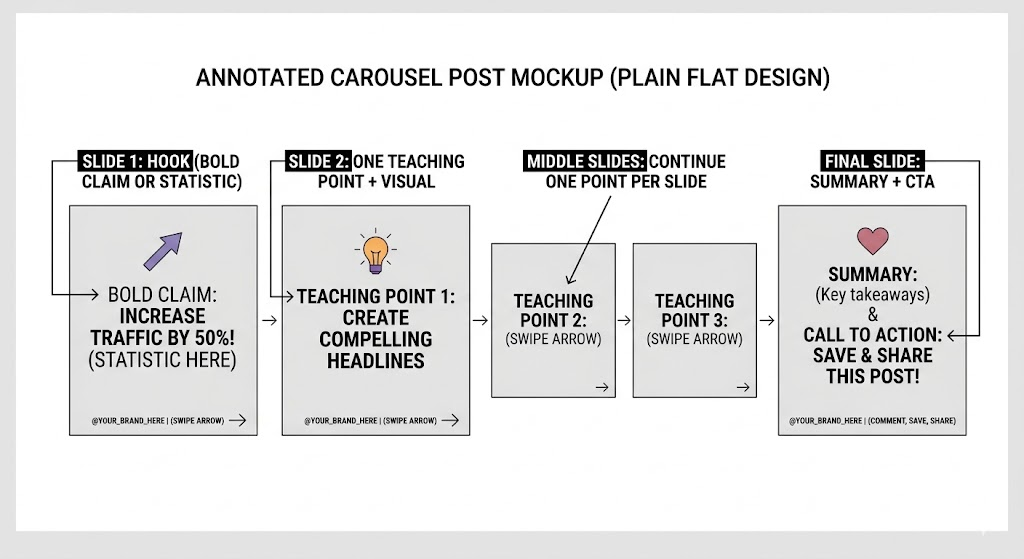
Informative carousels — educational posts that teach something specific — are consistently the highest-saved format on Instagram. Here is how to create one that people actually read and keep.
Step 1: Pick one specific topic Not “tips for better sleep.” Instead: “Why you wake up at 3am and how to stop.” Specificity is what makes people feel the post is for them.
Step 2: Write the hook slide first Your hook is the single most important element. It needs to stop someone mid-scroll. Use one of these formulas:
- A counterintuitive claim: “You are probably brushing your teeth wrong.”
- A compelling number: “The 7-second rule that changes how people see you.”
- A specific promise: “How I cut my Instagram posting time by 80%.”
Step 3: One point per slide Each slide teaches exactly one thing. Not two. Not three. One. This creates the “just one more” pull that keeps people swiping. Keep each slide to 30 to 50 words maximum.
Step 4: Add a visual anchor to each slide An icon, an illustration, a relevant photo, a chart. A slide with only text performs 15 to 25% worse than a slide with text plus one supporting visual. The visual does not have to be elaborate — a single relevant icon is enough.
Step 5: Add a “swipe” indicator on slide 1 Include a small arrow or “swipe left” prompt on your first slide. Obvious as it sounds, this increases swipe-through rates meaningfully, particularly for new followers who may not immediately recognize the carousel format.
Step 6: End with a save prompt “Save this for the next time you need it.” This single instruction is the highest-performing CTA for informative carousels because it directly requests the action most valuable to your reach.
Instagram Carousel Caption Formula
Your caption does not summarize the carousel. It is a second hook. Its job is to make someone who only sees the first image feel they need to open the post and keep reading.
The formula:
Line 1 (hook): A bold, self-contained statement that echoes the carousel topic. “Most people ruin their carousels on slide one.”
Lines 2 to 3 (expand): Add just enough context to create interest without giving away the content.
Line 4 (open loop): Create a small gap. “Slide 5 is the one I wish someone had told me earlier.”
Line 5 (CTA): One specific action. “Save this. Come back to it when you start your next carousel.”
Caption examples for common carousel types:
For educational carousels: “[Bold teaching statement]. Most people have this backwards. Here is the simple explanation that took me too long to find. Save this for the next time you need to explain this to someone.”
For how-to carousels: “The step I always forget to include — and the one that makes the biggest difference. Full process inside. Save it if you need it.”
For personal story carousels: “Two years ago this mistake cost me [specific thing]. Here is what I actually learned. Slide 4 is the one I come back to.”
Instagram Carousel Best Practices (2026)
Post at the right time Instagram carousels perform best when posted between 7am and 9am or 6pm and 9pm in your audience’s local time zone. Use Instagram Insights to find when your specific followers are most active.
Use the first slide as your only “billboard” Only the first slide shows in the feed before someone decides to engage. Treat it exactly like an ad headline — one clear message, no clutter, immediate value signal.
Keep consistent branding across all slides One font pair. Two to three brand colors. Your handle in the corner of every slide. Consistency signals professionalism and makes your content instantly recognizable in feeds.
Reply to comments in the first 30 minutes The first 30 minutes after posting are the highest-leverage window for reach. Every comment you reply to increases the engagement rate and tells the algorithm the post is worth distributing further.
Never use more slides than you need More slides is not always better. Every unnecessary slide is a place someone can stop swiping. Include the minimum number of slides required to fully deliver the value you promised.
Add a “swipe left” prompt on slide 1 A small arrow, a visual cue, or the words “swipe for more” on your first slide meaningfully increases the percentage of people who swipe through. Many users, especially newer followers, need the prompt.
AI Prompts to Generate Instagram Carousel Ideas and Copy
These prompts work in Claude (claude.ai) or ChatGPT. Fill in the brackets and use the output as your starting point.
Prompt 1: Generate carousel ideas for your niche
Give me 10 Instagram carousel post ideas for a [your niche or job, e.g.
"nutritionist" / "freelance designer" / "SaaS founder"].

For each idea:
- A specific hook (first slide text, under 12 words)
- The format type (educational, how-to, story, list, etc.)
- A one-line description of what the carousel teaches or shows

Make them feel like real human posts, not generic advice.
Prompt 2: Write the full slide copy for an educational carousel
Write the slide-by-slide copy for an educational Instagram carousel on
the topic: [your specific topic].

Requirements:
- 7 to 9 slides total
- Slide 1: a bold hook under 10 words that stops the scroll
- Slides 2 to 7: one specific teaching point per slide, 30 to 50 words each
- Slide 8: a summary or key takeaway
- Slide 9: a CTA that asks people to save or comment

Keep the tone [professional / conversational / casual].
Do not use the phrase "in conclusion."
Prompt 3: Write a before-and-after carousel
Write a before-and-after Instagram carousel about [transformation topic].

Structure:
- Slide 1: Hook that teases the transformation without giving it away
- Slide 2 to 3: The "before" — the problem or starting point
- Slide 4 to 5: The turning point or process
- Slide 6 to 7: The "after" — the result with specifics
- Slide 8: The lesson
- Slide 9: CTA asking followers if they have experienced the same

Use specific details. Avoid vague language like "amazing results."
Prompt 4: Generate carousel captions
Write 3 Instagram captions for a carousel post about [your topic].

Each caption should:
- Open with a bold, scroll-stopping first line (the only line visible before "more")
- Be 150 to 300 words total
- Include a reference to one specific slide ("Slide [X] is the one I come back to")
- End with a question that invites a comment
- Sound like a real person wrote it, not a brand

Tone: [casual and personal / professional and authoritative / warm and educational]
Create Your Instagram Carousels Faster
Designing each carousel from scratch in Canva or Photoshop takes 30 to 60 minutes per post. That friction is why most people post inconsistently.
Contentdrips has a full library of Instagram carousel templates built at 1080 x 1350 px. You pick a template, drop in your copy, apply your brand kit (fonts, colors, logo), and export your slides ready to post — in under 5 minutes.
You can also use the Instagram carousel maker to turn any topic, blog post, or YouTube video into a fully designed Instagram carousel automatically. The AI writes the slide copy, picks a template, and generates the design in seconds.
Try Contentdrips for free — No credit card required.
Frequently Asked Questions
What is an Instagram carousel post? An Instagram carousel post is a single post containing between 2 and 20 photos, videos, or a mix of both. Followers swipe left to scroll through the slides. It is also called a swipe post, multi-image post, or slide post.
How do you create a carousel post on Instagram? Tap the + button, select multiple photos or videos using the stacked squares icon, arrange them in order, choose your aspect ratio, write your caption, and tap Share. For designed carousels, create your slides in a tool like Contentdrips, export them as PNG files, and upload them the same way.
How many photos can you include in an Instagram carousel? As of 2026, Instagram allows up to 20 slides per carousel post. The previous limit was 10. Each slide can be a photo, a video up to 60 seconds, or a mix of both.
What is the best size for an Instagram carousel post? The recommended size is 1080 x 1350 px (portrait). This fills more of the phone screen than the square 1080 x 1080 px format, which increases dwell time and engagement. All slides in a carousel must be the same aspect ratio.
Do carousel posts get more reach on Instagram? Yes. Carousels consistently outperform other formats on Instagram. They generate up to 3x more engagement than single-image posts and benefit from Instagram’s re-show mechanic, which presents the carousel again to users who did not engage the first time, starting on a different slide.
What should the first slide of an Instagram carousel say? The first slide should function like a headline. It needs to stop someone mid-scroll and make them want to swipe. The most effective approaches are a counterintuitive claim, a specific compelling number, or a promise of a clear outcome. Avoid starting with “In this post I will…”
Can you mix photos and videos in an Instagram carousel? Yes. Instagram allows you to mix photos and videos in a single carousel. Each video slide can be up to 60 seconds long.