Most design tools wait for you to act. You pick a template, drag elements around, adjust colors, swap fonts, export. An AI design agent flips that entirely. You describe what you want in plain English, and the agent builds the design for you, refining it based on your follow-up messages. It’s less like using software and more like briefing a designer who responds in seconds. The underlying technology combines large language models (which understand your intent) with generative design capabilities (which produce the actual visual), running in a loop until the output matches what you asked for.
Contentdrips built its version of this directly into the canvas. Their AI Design Agent takes a prompt, applies your brand kit, and produces a publish-ready social post with no template browsing and no drag-and-drop. You can then keep talking to it: “make the text bolder,” “target this at B2B founders,” “turn this into a bar chart.” It holds the context of your canvas between messages, handles everything from quote cards to carousels to data visualizations, and is available across all plans including Free. The catch is that it costs 25 credits per run, making it the most expensive single action in the whole app. Which is exactly what this post is here to figure out.
1. The 25-credit question
Here’s the thing that makes you pause before clicking “generate.”
On the Contentdrips credit table, the AI Design Agent costs 25 credits per run, tied with AI Image Generation as the single most expensive action in the whole app and 2.5x the cost of the AI Carousel Maker or AI Graphic Maker (10 credits each). On the Free plan’s one-time 50 credits, that’s two generations. Two. Then you’re out.
So the real question isn’t “is the AI Design Agent cool?” Obviously it demos well. Type a sentence, watch a branded post assemble itself. The question is narrower and more honest: is one run actually worth a quarter of your free allowance, or are you better off spending those credits somewhere cheaper?
We didn’t want to answer that with marketing adjectives, so we ran it. Three real prompts, real outputs, real timings, real credit counts. All runs were succesfully generating results and postable items.
2. What the AI Design Agent actually does
Quickly, so the test makes sense.
The AI Design Agent is the agentic mode inside the Contentdrips canvas. You open a blank canvas, describe the post you want in plain English, and a complete, on-brand graphic appears. No template to browse, no drag-and-drop. From there you don’t reopen layers; you just message it: “make the background darker,” “add a statistic,” “target this at B2B founders.” It keeps the context of your canvas between requests, applies your brand kit automatically when the branding toggle is on, and handles formats from quote cards to carousels to data visualizations.
That last one matters for the test. It can turn raw data into a designed chart from a single prompt, which is something a static template simply can’t do.
If you want the full feature tour or just want to poke at it yourself first, it lives here: Contentdrips AI Social Media Post Generator →
3. At a glance: where 25 credits sits in the credit economy
Before judging the cost, it helps to see what 25 credits is relative to everything else you could spend them on.
| Action | Credits |
|---|---|
| AI Text Edits | 2 |
| AI LinkedIn Post | 8 |
| AI Graphic Maker | 10 |
| AI Carousel Maker | 10 |
| AI Ideas Generation | 10 |
| Blog → Carousel / Post | 15 |
| YouTube → Carousel / Post | 15 |
| AI Design Agent | 25 |
| AI Image Generation | 25 |
Now translate that into what your plan actually buys you per month:
- Free (50 one-time credits): About 2 AI Design Agent runs, total. Use them deliberately.
- Starter (1,500 credits/mo): About 60 runs a month, roughly two a day.
- Teams (5,000 credits/mo): About 200 runs a month, comfortably daily for a whole team.
So on a paid plan, 25 credits is a rounding error. On Free, it’s a real decision. Either way, knowing the conversion rate changes how you think about each click.
See the full plan breakdown and exact credit allowances on the Contentdrips pricing page →
4. The honest test: 3 real prompts, 3 real outputs
This is the part that earns the headline. Each test follows the same structure so you can compare them fairly: The Need, the Prompt, the Output, time, credits spent, and verdict.
To run these: open the AI Design Agent on a blank canvas, turn your brand kit on, and note your credit balance before you start. Capture a screenshot of each output, time how long the generation takes, and write down your gut reaction the moment you see it. Those first impressions are the most honest detail in the whole piece.
Test 1: From scratch, where no template could help
The Need: A data-driven post for a finance/markets audience, the kind of thing you’d normally hand to a designer with a spreadsheet attached.
The Prompt:
“Provide a line chart showing the price of gold over the last 5 days. Make the design modern and make sure you use whites and pinks smartly to achieve the goal. Make sure the axes are correctly plotted and labelled. Background should be completely white. “
The Output:
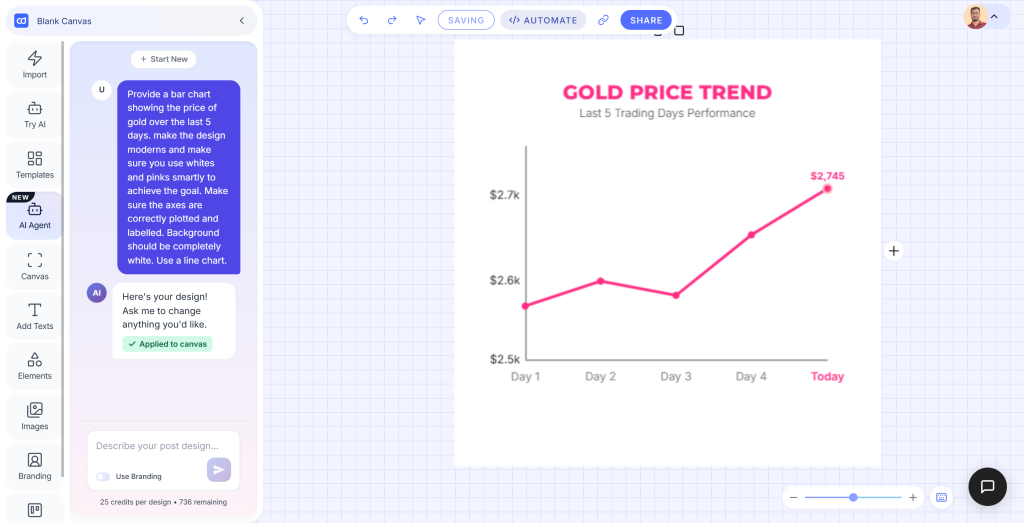
Time: Under 2 seconds. Credits spent: 25 (balance: 761 to 736)
Verdict: Perfect output. The axes were correctly plotted and labelled, the white and pink palette landed exactly as prompted, and the design was clean enough to publish without any cleanup. This is precisely the kind of post the AI Design Agent exists for: data-driven, format-specific, and impossible to replicate with a static template. A clear yes on 25 credits.
Test 2: Conversational iteration (the “designer you can talk to” promise)
The Need: One idea, refined live, the way you’d actually brief a junior designer over Slack.
The Prompt sequence:
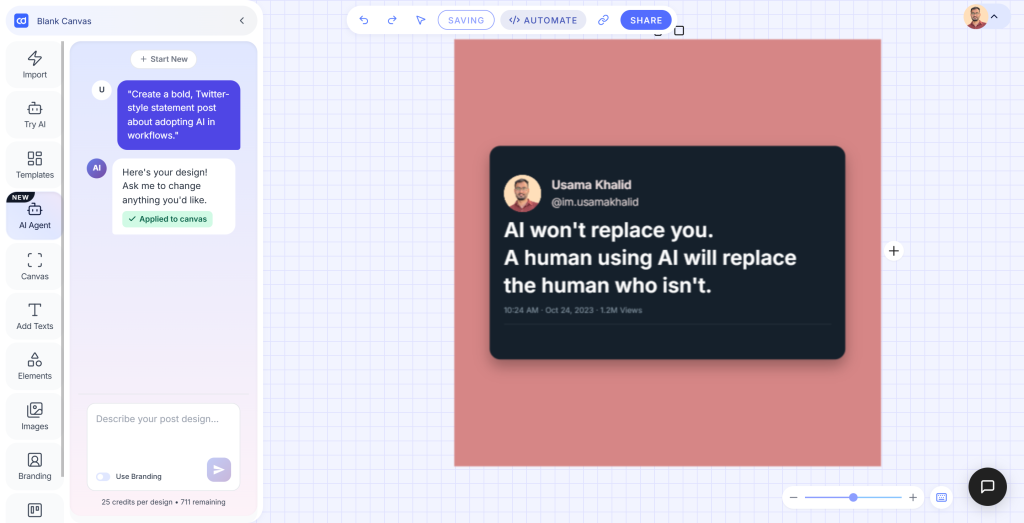
- “Create a bold, Twitter-style statement post about adopting AI in workflows.”
- “Rewrite the message to target B2B founders.”
- “Change the background to a light blue.”
The Outputs:
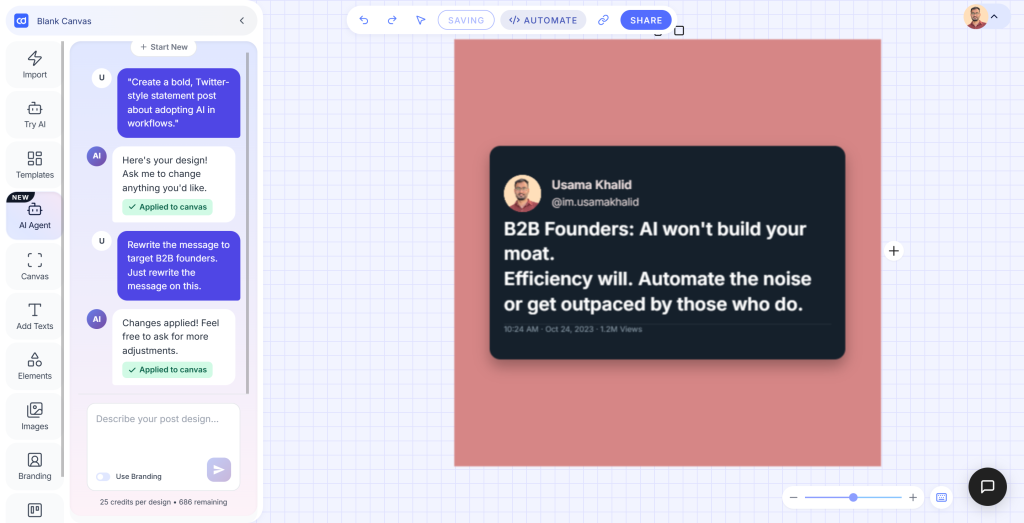
2.1 — Initial generation: A dark tweet-style card on a salmon/pink background. Text: “AI won’t replace you. A human using AI will replace the human who isn’t.” Clean, bold, immediately shareable. (Credits: 736 to 711)
2.2 — After “Rewrite the message to target B2B founders”: Same layout and format retained, message updated to “B2B Founders: AI won’t build your moat. Efficiency will. Automate the noise or get outpaced by those who do.” The agent rewrote the copy with the right audience voice and applied it without touching anything else. (Credits: 711 to 686)
2.3 — After “Change the background to a light blue”: Background updated and applied to canvas. The line element positioning shifted very slightly but nothing that would stop you publishing. (Credits: 686 to 661)
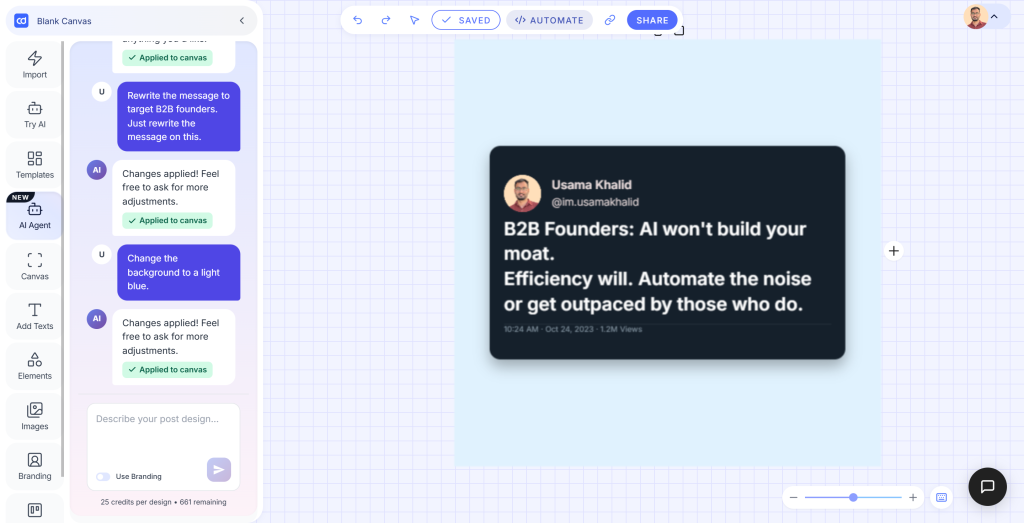
Time: Step 1: about 1 second. Step 2: about 3 seconds. Step 3: about 1 second. Credits spent: 25 per generation (each step counted as a fresh run), totalling 75 credits across the three iterations.
Verdict: It did everything asked, first try, each time. The audience retargeting in Step 2 was the real standout — the agent rewrote the copy with the right register for B2B founders without being prompted on tone, just audience. The background change in Step 3 applied cleanly, with one line element sitting very slightly out of position, which was a minor issue rather than a blocker. The bigger thing to flag is the credit cost: three conversational steps means three lots of 25 credits. If you’re iterating heavily, that adds up fast. Plan your prompt before you start.
Test 3: Same goal, two paths (Agent vs. template)
The Need: A LinkedIn carousel, a recurring branded format, produced two different ways so we can compare cost head-to-head.
Path A: AI Design Agent, carousel from a prompt (25 credits) Path B: An existing LinkedIn carousel template with AI Carousel Maker (10 credits)
The Outputs:
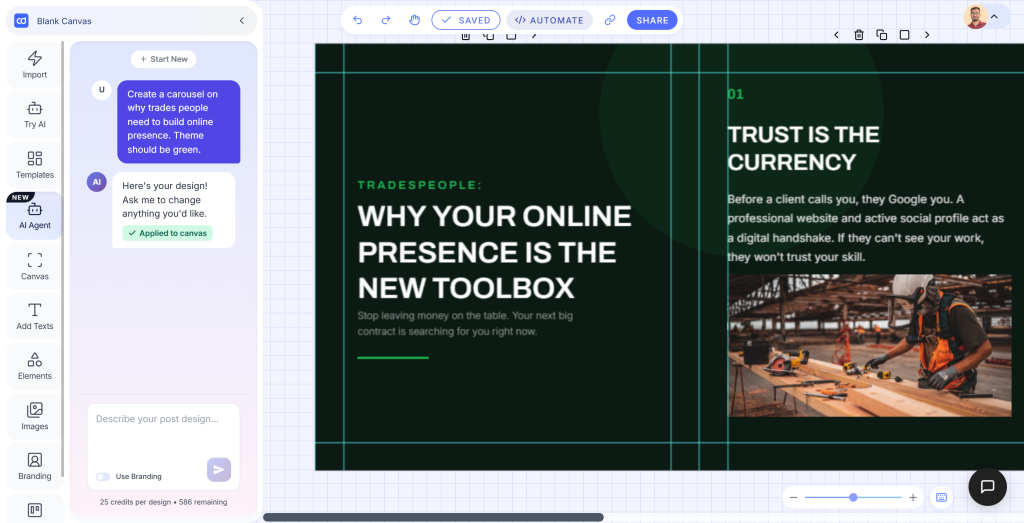
3.1 — AI Design Agent: A fully designed, multi-slide LinkedIn carousel on a dark green theme. Cover slide: “Tradespeople: Why Your Online Presence Is The New Toolbox.” Subsequent slides carried through the visual language with bold headers, supporting body copy, and a relevant stock image pulled in automatically. Polished enough to surprise you. (Credits: 611 to 586)
3.2 — Template + AI Carousel Maker: A carousel on a matching olive green palette using an existing template. Cover: “why trades people need an online presence.” Content-wise it covered the same ground, but the layout relied on the template’s fixed structure. Functional and on-brand, but visibly less considered than 3.1. (Credits: 586 to 576)
Credits spent: A: 25 · B: 10
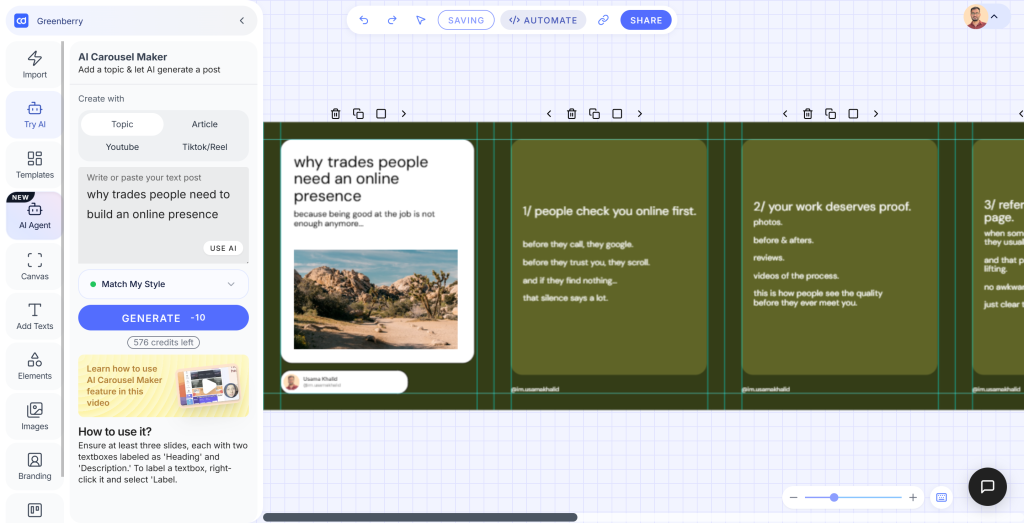
Verdict: Path A won on polish, clearly. The AI Design Agent produced a more cohesive, visually intentional carousel — the hierarchy, the headline framing, the image placement all felt designed rather than filled in. Path B was competent and faster to set up if you already have a template you trust, but side by side the 15-credit gap showed. For a one-off carousel on a topic you care about, Path A is worth it. For your regular weekly format where the template already works, Path B is the smarter spend.
Totals for the session: 100 credits used across all three tests · 576 remaining
5. Where the 25 credits clearly pays off
Pulling the wins out of the tests above, the AI Design Agent earns its cost when:
- You’re starting from a blank page for a one-off or unusual format. When no template fits, an oddly specific announcement, a weird aspect ratio, a layout you’ve never made before, skipping the blank-canvas paralysis is worth real money.
- You’re iterating toward something, not reproducing something. The conversational editing genuinely replaces the “reopen the file, hunt for the layer, nudge it, export, repeat” loop. If you don’t know the final design when you start, the back-and-forth is where the value lives.
- You need data turned into design in one move. A chart-based post from raw numbers is something a static template fundamentally can’t do. This is the single most defensible use of 25 credits.
6. Where it’s not the best use of your credits
Honesty cuts both ways, and Test 3 makes the case against itself.
For recurring, branded formats like your weekly LinkedIn carousel, your standard quote-card series, or anything you make the same way every time, the AI Design Agent is often the wrong tool. A proven template plus the cheaper AI Carousel Maker (10 credits) tends to get you the same publish-ready result for 15 fewer credits and less fiddling. You’re paying a premium for “figure out the design from scratch” when the design is already a solved problem.
If that’s your situation, start from a ready-made layout instead: Contentdrips LinkedIn Carousel Templates → Same output, lower cost, faster.
7. A simple framework: should you spend the 25 credits?
You don’t need our verdict for your specific post. You need a way to decide. Run your post through these three questions:
- One-off or recurring? Recurring: use a template. One-off: the Agent is in play.
- Templated or custom? A format you already have a layout for: use a template. Something genuinely new: use the Agent.
- Text-only or data-driven? Plain text or quote post: cheaper tools handle it. A chart or data visual: the Agent is the only real option.
The pattern: the more unusual, custom, or data-heavy the post, the more 25 credits makes sense. The more routine and repeatable it is, the more you should reach for a template and save the credits.
8. Scaling it: running the Agent without the canvas
Everything above is the manual, one-post-at-a-time path. If you’re an agency or a SaaS team that needs this at volume, the same 25-credit capability is available programmatically.
The run_ai_design_agent action is exposed through the Contentdrips MCP server →, which means any MCP-compatible agent can trigger designs as part of an automated workflow, no clicking through the canvas. For a no-code way to wire that into agentic pipelines, Contentdrips OpenClaw → connects the same engine to broader automation. The credit math from Section 3 still applies, so the “one-off vs. recurring” framework matters even more at scale: automate the genuinely custom work, template the repeatable stuff.
9. The verdict
So. Is the AI Design Agent worth 25 credits?
Worth it when: you’re building something one-off, custom, or data-driven, and especially when you’re iterating toward a design you can’t picture yet. Test 1 proved it in under 2 seconds: a data visualisation that no template could touch. Test 3’s carousel showed the same — the Agent’s output was noticeably more polished than the template route.
Skip it when: you’re producing a recurring, templated format. Test 3 Path B got to a perfectly good carousel for 10 credits. And Test 2 is the honest warning: three conversational iterations burned 75 credits. If you’re going to iterate, plan your prompt before you start.
On a paid plan, the cost is trivial enough that you can use it freely. On the Free plan, treat your two runs like the limited resource they are. Spend them on the work that templates genuinely can’t do.
Your next step, depending on where you are:
- Want to try it yourself? Run the AI Design Agent free →
- Wondering how many runs your plan gets? Check the pricing & credits →
- Making recurring carousels? Start from a template instead →
- Scaling with automation? Explore Contentdrips OpenClaw →
Frequently asked questions about AI design agents
Is an AI design agent the same as an AI image generator? Not quite. An AI image generator produces a photograph or illustration from a text prompt, typically a single static output you can’t easily edit or iterate on. An AI design agent produces a designed social post, carousel, or graphic using real layout, typography, and your brand colors, and it keeps working with you conversationally. You can say “move the text to the bottom” or “make it feel more B2B” and the agent updates the design. It’s a workflow tool, not a one-shot image creator.
Do I need design skills to use one? No. The point of the agentic approach is that the AI handles layout, hierarchy, and visual decisions. You bring the idea; the agent brings the execution. That said, better prompts get better results. Being specific about the audience, the tone, the platform, and the goal (“a bold LinkedIn post for finance founders, clean and minimal, data point front and center”) gives the agent more to work with than “make a post about gold prices.”
How is it different from using a template? A template is a fixed layout you fill in. An AI design agent starts from your intent and builds the layout to match it. Templates are faster and cheaper for recurring, branded formats you already have solved. The agent earns its place when the format is one-off, the brief is unusual, or you need something a template can’t do at all, like turning a data table into a chart-based post.
Can it apply my brand automatically? Yes, if you’ve set up a brand kit. Most AI design agents (including Contentdrips’) let you toggle your brand on so that your colors, fonts, and logo are applied to every output by default. You don’t have to specify “use my brand blue” in every prompt.
Does every message to the agent cost credits? This depends on the platform. On Contentdrips, the initial generation costs 25 credits. Whether follow-up edits and iterations within the same canvas session cost additional credits is worth testing directly, as this is one of the most practically important things to know before using the agent at volume.
What kinds of posts can an AI design agent create? Most handle single-image graphics, quote cards, data visualizations and charts, carousel slides, infographics, announcement posts, and promotional banners. More advanced agents can handle multiple formats across LinkedIn, Instagram, and other platforms from the same prompt.
Is it worth it for solo creators, or just for teams? Both, but for different reasons. Solo creators benefit most from the blank-canvas speed: no more staring at an empty artboard or wrestling with a template that almost fits. Teams and agencies benefit from the volume: the agent can produce a large number of posts quickly and consistently without extra headcount. On a paid plan with a healthy credit allowance, the per-post cost becomes low enough that it’s practical at scale.
How does an AI design agent compare to hiring a freelance designer? For one-off, high-stakes work (a brand identity, a campaign hero image, something that needs genuine creative judgment), a human designer is still the better call. For recurring social content, quick turnarounds, and volume work, an AI design agent is significantly faster and cheaper. The honest answer is that most creators and marketers need both: the agent for day-to-day social output, a human designer for the work that really matters.