If you publish LinkedIn carousels once a week, you have time to fuss. You can open a design tool, drag things around for an hour, export, upload, and call it a day. But if you’re publishing daily while managing content for a team or clients, that workflow breaks fast.
The “best” carousel maker for LinkedIn isn’t one tool. It’s whichever tool matches how often you publish, whether you care about writing or design (or both), and whether you need your brand applied automatically or are happy to do it manually. This guide maps each type of creator to the right fit.
Quick answer if you’re in a hurry: For daily LinkedIn publishing where you need writing and design in one place, Contentdrips is purpose-built for the full workflow. For a focused, fast carousel generator with no extra bloat, CarouselMaker.co and aiCarousels.com both get it done quickly. For a LinkedIn-first tool that combines AI writing with carousels and scheduling, Supergrow.ai is the alternative to beat.
At a Glance
Contentdrips
Supergrow.ai
aiCarousels.com
CarouselMaker.co
Best for
Daily LinkedIn publishers who want the full loop in one tool
LinkedIn-first creators who want AI writing and carousels
Fast, no-frills carousel generation
Carousel-only creators who want speed and simplicity
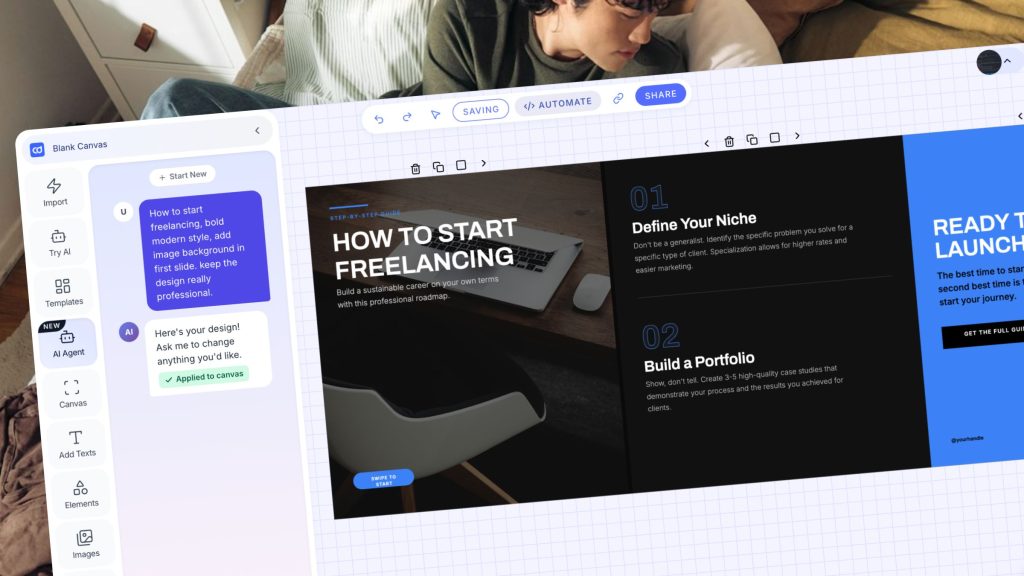
Contentdrips AI Design Agent: Generate editable graphics using natural language.
Who Is Each Tool For?
Contentdrips is for creators who think about LinkedIn as a content operation, not a hobby. It’s built around the full loop: generate the idea, write the post, design the carousel, apply your brand, schedule it. If you’re publishing 5+ times a week, running a personal brand, or managing LinkedIn for clients, the all-in-one workflow is the point.
Supergrow.ai is for LinkedIn-first creators who want AI that learns their voice. Its standout feature, PostCast, interviews you for 10 to 15 minutes, extracts your ideas through structured questions, and turns your answers into a week of LinkedIn posts. The Content DNA profile learns from your writing over time. A carousel maker is included on the Pro plan ($39/month). If writing consistently in your own voice is the core challenge, Supergrow’s approach is genuinely different.
aiCarousels.com is for creators who want to go from topic to finished carousel as fast as possible. Give it a topic, a blog URL, a YouTube link, or a PDF, and it generates a complete multi-slide carousel in one click. No scheduling, no post writer, no broader content system. For pure carousel creation speed, it’s one of the fastest options in the category.
CarouselMaker.co is a carousel-first tool built for LinkedIn, Instagram, and TikTok. It handles the core carousel workflow well: enter a topic or paste text, pick a template, customize, and export as PDF. There’s no native scheduling (CarouselMaker.co’s own blog sends you to LinkedIn’s native scheduler or third-party tools for that step) and no LinkedIn post writer. It’s a clean, focused tool and the free tier means zero barrier to try it.
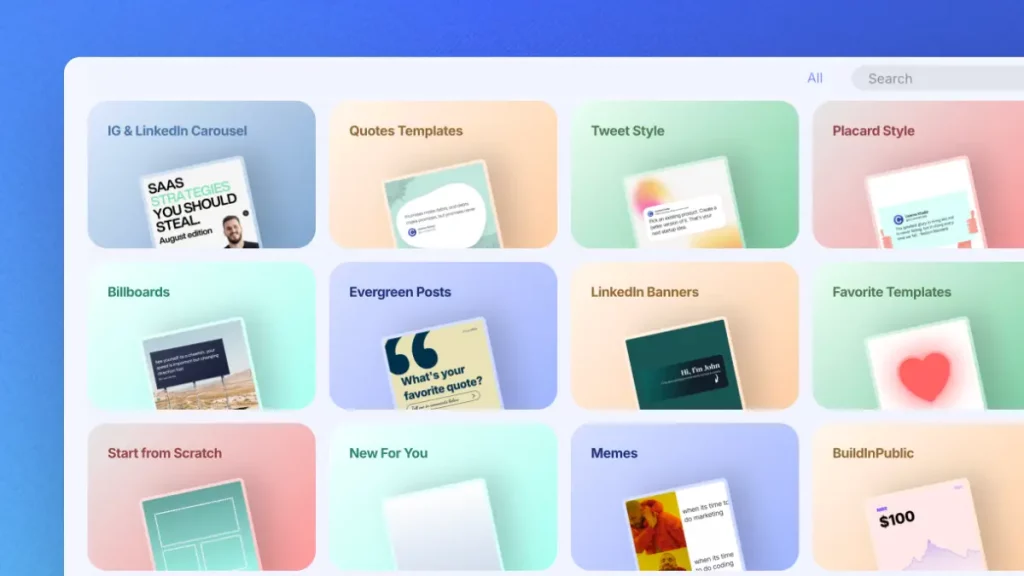
Contentdrips Template Library: Contentdrips has an extensive template library for linkedin carousels and all kinds of posts.
Pick X If You…
Pick Contentdrips if you publish daily and can’t afford to lose two hours to design
The core problem for daily LinkedIn publishers isn’t creativity. It’s throughput. Most carousel tools ask you to design slide by slide. Contentdrips inverts this: you describe the post you want in plain text, and the AI Design Agent builds the full carousel covering layout, typography, colors, and copy directly on the canvas. You iterate in conversation: “make it more minimal,” “change the background to navy,” “retarget this for founders.”
What makes it fast for daily publishing specifically:
AI Post Writer generates LinkedIn-native copy from a topic, article, YouTube video, or even a TikTok. You don’t start from a blank page.
Match My Style learns from your past posts so generated content sounds like you, not like a chatbot.
Bulk Post Planner lets you create up to two weeks of posts, both written and visual, in one session, then schedule them all to LinkedIn and Instagram.
Brand kit is applied automatically. You set fonts, colors, and styles once; every carousel inherits them by default.
The AI Design Agent costs 25 credits per design. If you’re designing 30 carousels a month, that’s real. Budget for it. For daily publishers, the time saved per design makes the math work, but it’s worth knowing before you commit to a plan.
Real limitation to know: Contentdrips is purpose-built for LinkedIn and Instagram. If your workflow spans many platforms with radically different visual requirements, a dedicated design tool gives you more raw flexibility.
Pick Supergrow.ai if your main problem is writing consistently in your own voice
Supergrow’s PostCast is the most distinctive feature in this category. Instead of asking you to type a topic into a blank box, it schedules a 10 to 15 minute AI interview with structured questions about your work, opinions, and recent experiences, then converts your spoken answers into formatted LinkedIn posts. For creators who can talk their expertise but struggle to translate it into written content, this approach works differently from anything else in the market.
Beyond PostCast, Supergrow’s Content DNA profile builds over time from your writing samples and interview transcripts, making AI output progressively more accurate to your voice. Independent reviewers who’ve tested the voice-learning capability describe the personalization as “genuinely impressive” compared to standard AI outputs.
What the carousel maker looks like in practice: The carousel creator is included on the Pro plan at $39/month. Multiple reviewers (including a December 2025 and a May 2026 review) note the visual tools as a work in progress. One described it as “not great yet, but I know they’re working on it.” Treat the carousel maker as a useful convenience, not the main reason to choose Supergrow. The writing is the product.
Scheduling: Included on all plans. The Starter plan ($19/month) covers core features including the AI post generator, scheduling, and content calendar. The Pro plan ($39/month) adds the carousel maker, analytics, and unlimited PostCast sessions.
Real limitation to know: Analytics are locked behind the Pro plan ($39/month). If you want to track post performance, Starter isn’t enough.
Need the full write, design, and schedule workflow in one place instead? Try Contentdrips →
Pick aiCarousels.com if you want the fastest path from idea to finished carousel
aiCarousels.com does one thing and does it well: turn content into a carousel fast. Feed it a topic, a blog URL, a YouTube link, or a PDF, and it generates a complete multi-slide carousel including copy and design in seconds.
The AI content generation is where it earns its reputation. Give it a topic like “5 B2B sales tips” and it produces structured, actionable slides immediately. The repurposing workflow is one of the fastest in the category: paste a blog URL and get a carousel. For creators who already have existing content to repurpose (articles, newsletters, talks), aiCarousels.com removes most of the friction.
There’s no native scheduling. There’s no LinkedIn post writer. There’s no bulk planner. If you have a content system you’re already happy with and just need a fast carousel generator to plug into it, that’s the use case this tool is built for.
Pricing: Free version available. Paid plans unlock additional AI features and higher usage limits. The tool works across LinkedIn, Instagram, and TikTok.
Real limitation to know: For creators who need help with what to write and not just how to design it, aiCarousels.com doesn’t solve that problem. It assumes you know what you want to say.
Pick CarouselMaker.co if you want a clean, focused carousel tool with no learning curve
CarouselMaker.co is built specifically for carousel creation on LinkedIn, Instagram, and TikTok, with every template pre-sized and formatted for each platform’s carousel spec. The workflow is straightforward: enter a topic or paste your text, pick a template, customize colors and fonts, and export as PDF for LinkedIn. The AI handles slide structure and copy. You edit and personalize.
The free tier is genuinely functional with no credit card required, and you can generate and download carousels immediately. Pro plans start at $14.99/month for unlimited carousels, more AI credits, and additional template access. There’s also a lifetime access option for a one-time payment.
CarouselMaker.co has no native scheduling. Their own blog guides you to use LinkedIn’s native scheduler (which supports posting up to 90 days ahead) or a third-party scheduling tool. There’s no LinkedIn post writer or content planning system. The tool is narrow by design.
What it does well: The brand kit (on paid plans) lets you upload custom fonts, add your logo, and set brand colors for consistent outputs. The template library is well-organized for carousel-specific formats. The AI generates hooks, value slides, and a CTA slide with a solid default structure.
Real limitation to know: If you publish daily and need help with writing, ideas, and design, CarouselMaker.co covers only one leg of that stool. You’ll be stitching it together with other tools.
Feature Deep Dive: What Actually Matters for LinkedIn
AI writing that sounds like you
Only two tools here have a LinkedIn post writer built in: Contentdrips and Supergrow. They take different approaches.
Contentdrips’ Match My Style learns from your past posts and keeps the AI output aligned with your voice and format. You can generate from a topic, an article, a YouTube video, or repurpose from existing content, all within the same platform where you’re building your carousel.
Supergrow’s PostCast and Content DNA is more conversational. It builds your voice profile from AI interviews and your historical posts, then applies that profile to everything it generates. For creators with a strong but hard-to-replicate personal voice, this approach goes deeper.
aiCarousels.com and CarouselMaker.co don’t have LinkedIn post writers. They generate slide copy only. The caption that accompanies the carousel on LinkedIn is your job.
AI design: conversational versus template-based
Contentdrips’ AI Design Agent is the only conversational design tool in this comparison. Type what you want, the AI generates a complete design, you refine in chat. It’s closer to working with a designer than browsing templates. Each generation applies directly to your canvas, fully editable.
The other three tools, Supergrow, aiCarousels.com, and CarouselMaker.co, all use template-based AI design. You select or are assigned a template, the AI populates it with your content, and you customize from there. This is fast and produces consistent results, but iterating through conversation isn’t how it works.
Scheduling and bulk workflow
Contentdrips’ Bulk Post Planner lets you create up to two weeks of written and visual content in one session, then schedule everything directly to LinkedIn and Instagram. For daily publishers, this is what makes the math work. One focused planning session beats a daily scramble.
Supergrow includes scheduling on all plans, with a calendar and queue. You can batch content and schedule it in advance, though the bulk planning workflow isn’t as consolidated as Contentdrips’.
aiCarousels.com and CarouselMaker.co have no native scheduling. You export and post manually, or use LinkedIn’s native scheduler, which supports carousel (PDF document) posts up to 90 days ahead.
Branding and consistency at scale
Contentdrips applies your brand by default. The Use Branding toggle on the AI Design Agent applies your saved brand kit to every AI-generated design automatically. For daily publishers, “consistent by default” is more valuable than “consistent if you remember.”
Supergrow supports brand settings applied to generated posts. CarouselMaker.co’s paid plans include brand kit features (custom fonts, logo, colors). aiCarousels.com has limited brand controls.
Team collaboration
Contentdrips and Supergrow both support team workflows. Contentdrips is built for agency and creator team pipelines. Invite team members, collaborate on the content calendar, and manage the full publish workflow together. Supergrow’s agency plans (from $69/month for up to 4 clients) support separate workspaces and scheduling per client.
aiCarousels.com and CarouselMaker.co are single-user tools with no meaningful team features.
Pricing Reality Check
Contentdrips: Paid plans with a free trial. Credits are used for the AI Design Agent (25 credits per design) and AI writing features. Check current pricing at contentdrips.com.
Supergrow.ai: Starter plan at $19/month (AI post generator, scheduling, content calendar, 2 PostCast sessions/month). Pro plan at $39/month (adds carousel maker, analytics, unlimited PostCast). Agency plans from $69/month. 7-day free trial, no credit card required.
aiCarousels.com: Free version available. Paid plans add AI features and higher usage limits. Check aicarousels.com for current pricing.
CarouselMaker.co: Free tier (no credit card required). Pro plans from $14.99/month for unlimited carousels and more AI credits. Lifetime access available for a one-time payment.
For daily publishers doing 20 to 30 carousels a month, the ROI math isn’t about which tool is cheapest. It’s about how many hours you save and how many tools you’re stitching together. A tool that cuts design time from 45 minutes to 10 minutes per carousel saves 10+ hours a month. At that scale, price is rarely the deciding factor.
At 20 to 30 carousels a month, the tool that saves you 10+ hours pays for itself. Start with Contentdrips →
The Verdict: Match the Tool to Your Publishing Goal
If you need…
Use this
Full loop: write, design, brand, and schedule in one place
Contentdrips
AI writing that learns your voice plus LinkedIn scheduling
Supergrow.ai
Fastest carousel generation from existing content
aiCarousels.com
Clean, focused carousel tool with a free tier
CarouselMaker.co
The most common mistake LinkedIn creators make is using a carousel tool when they actually have a publishing workflow problem. CarouselMaker.co and aiCarousels.com will generate a beautiful carousel, but if you’re not sure what to post, haven’t written the caption, and have no system for scheduling, the carousel is only 20% of the job.
If posting daily is the goal, the tool you want handles the full loop from idea to scheduled post without you stitching together four different apps.
Want to see how the AI Design Agent works? Describe your carousel in plain text and get a fully designed, on-brand post applied directly to your canvas. Keep refining in conversation until it’s right. [Start building your first carousel →]
Also worth reading: [How the AI Design Agent works inside the Canvas editor →]