If you’ve searched “best image generation API” and felt like every answer was talking about a slightly different product, you’re not imagining it. That’s exactly the confusion this social media image API buyer guide is built to clear up. The term gets used for at least three different jobs, and most buyer’s guides quietly pick one meaning and compare only inside it. That’s exactly why so many people end up integrating a tool that turns out to be the wrong shape for what they’re building.
This guide starts by helping you figure out which job you actually have. Then it compares the real options inside that bucket, including where each one, ours included, genuinely falls short. (If you already know you want an API and just want the specifics, the Contentdrips API page covers pricing and setup directly.)
How this social media image API buyer guide is organized
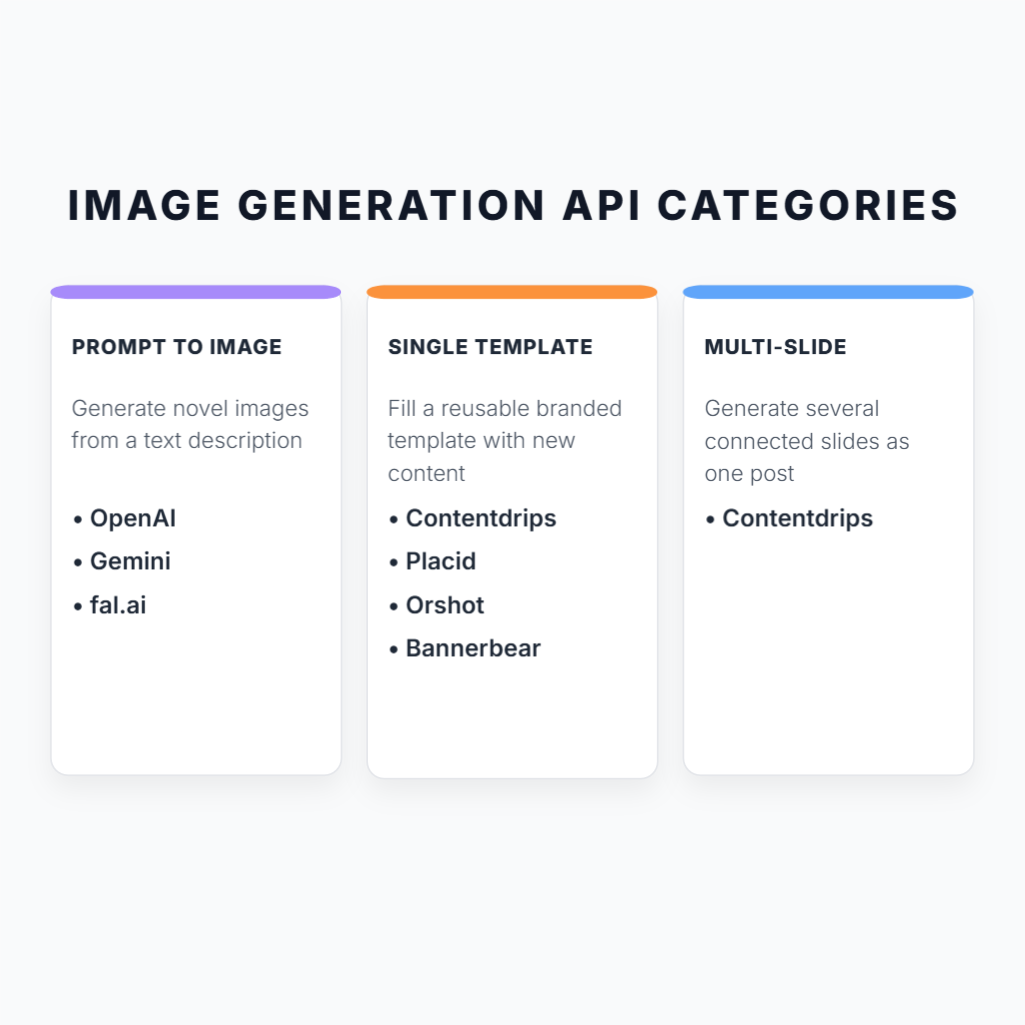
Before comparing any vendors, sort your use case into one of three buckets. Almost every evaluation mistake in this category comes from skipping this step.
| Bucket | What it means | Who’s in it |
|---|---|---|
| A. Prompt-to-image | Novel images generated from a text description | OpenAI Images API, Google Gemini, fal.ai, Replicate / Stable Diffusion |
| B. Single branded graphic | One static image filled from a reusable template | Bannerbear, Placid, Orshot, Imejis, RenderForm, APITemplate.io, Contentdrips |
| C. Multi-slide social content | A carousel or document post made of several slides that work as one unit | Contentdrips (native); everyone else via manual workarounds |
Most “best image API” round-ups only compare inside Bucket B. That’s fine if a single static graphic is genuinely all you need: an Open Graph image, a certificate, a product card. But if what’s actually sitting in your backlog is “generate LinkedIn carousels” or “turn a blog post into an Instagram carousel automatically,” Bucket B tools will get you partway there and then hand you the hardest part, assembling slides into one coherent post, as homework.
Bucket A: if you need genuinely novel images
If your use case is “describe an image, get something nobody has rendered before,” you’re not shopping for a template API at all. A few options worth knowing:
- OpenAI Images API: strong general-purpose generation and editing, simple REST interface, good for one-off creative work.
- Google Gemini (image generation): competitive quality, useful if you’re already in the Gemini ecosystem.
- fal.ai / Replicate: access to open-source models (FLUX, Stable Diffusion variants) with more control over speed and cost trade-offs than the closed APIs.
We won’t go deeper on this bucket here. It solves a different problem than the rest of this guide, and pretending otherwise would do you a disservice. If this is your use case, start there, not with anything else in this article.
Bucket B: single branded graphics from a template
This is the most crowded part of the category, and the tools here are genuinely mature.
- Bannerbear: the oldest name in the space. Deep SDK coverage (Ruby, Node, Python, PHP), well-documented, a known quantity if you’ve used it before.
- Placid: strong no-code integrations (Zapier, Make, Airtable), a polished visual editor, and one feature most competitors skip: unused credits roll over.
- Orshot: a newer, API-first entrant positioning on price and flexibility, with video and social-publishing features layered on top of its image API.
- Imejis, RenderForm, APITemplate.io: smaller but capable players, generally competing hardest on price and free-tier generosity.
Contentdrips also belongs in this conversation, and it’s easy to miss why. Every tool above requires you to design the template by hand in an editor before the API ever touches it. Contentdrips lets you skip that step: its AI Design Agent generates a complete template from a written prompt (layout, typography, colors), and you can apply a saved brand kit on top so the result is on-brand without manual styling. The API call afterward works the same way as everyone else’s. The difference is in how the template gets made in the first place.
Two more details worth knowing if you’re evaluating this bucket specifically. First, branding doesn’t have to be reapplied by hand on every request: pass your name, handle, bio, website, and avatar once in a branding object, and Contentdrips applies them automatically to any template with branding placeholders, the same brand kit logic as the carousel use case, just for single images. Second, the AI writing capability isn’t limited to carousels either. You can generate the copy for a single graphic the same way you’d generate carousel copy, from a topic, blog post, or video, and have it rendered straight into the template.
| Starting price | Recurring free tier | Template creation | Auto brand kit application | Best for | |
|---|---|---|---|---|---|
| Bannerbear | $49/mo (1,000 renders) | Trial credits only | Manual editor | No, set per template manually | Teams that own template design and want a battle-tested tool |
| Placid | $19/mo (500 credits) | Trial credits only | Manual editor | No, set per template manually | No-code, Zapier/Make-first workflows |
| Orshot | $39/mo | Limited free credits | Manual editor | No, set per template manually | API-first teams who also want video |
| Imejis / RenderForm / APITemplate.io | $9 to $30/mo range | Varies (some recurring) | Manual editor | No, set per template manually | Budget-sensitive, lower-volume use |
| Contentdrips | $39/mo (1,000 calls) | Recurring (50 AI credits) | AI-generated, prompt-to-template | Yes, one branding object applied automatically | Teams without a designer who still want on-brand output |
If a single static graphic is genuinely the whole job, any of these can do it. Contentdrips is worth a look even here, specifically if nobody on your team wants to spend time building the template by hand. But if what you actually need is more than one image working together as a set, a carousel, a document post, none of the tools above, Contentdrips included in this single-image mode, were really built for that. That’s a different job, and it’s the one the rest of this guide is about.
Bucket C: multi-slide social content, where this gets interesting
The structural gap nobody mentions
Here’s something the comparison posts in this category don’t say plainly: Bannerbear, Placid, Orshot, and Creatomate have no concept of a “carousel” as a single object. If you want a five-slide LinkedIn carousel out of any of them, you render each slide as its own separate image call, then stitch the results together yourself, into a PDF, into an ordered PNG sequence, however your pipeline is built. That stitching logic is on you.
It’s worth understanding why that gap exists rather than just noting it. A tool built API-first, for the general job of “fill in a template,” has no particular reason to know what a carousel is. Carousels are a social-media-specific concept, and a generic templating engine has to have that concept bolted on after the fact, if it gets added at all. Contentdrips’ API came from the opposite direction: it grew out of a tool built from day one to make LinkedIn and Instagram carousels, so a multi-slide post isn’t a feature someone added later. It’s close to the original reason the product exists. The practical result is that Contentdrips’ API has an actual carousel_content object with an intro slide, a slides array, and an ending slide, and a single POST request renders the whole thing as a unit.
One scope note before the code: this is a render API, not a publishing or scheduling system. You get back finished files (PNG or PDF). There’s no scheduling infrastructure to set up or manage on your end, and nothing about the API requires you to route content through any scheduling layer at all. If your own product needs to post directly to LinkedIn or Instagram, that’s a separate integration you build on top, the same as it would be with any other tool in this guide.
How the API actually handles this
Here’s the real request shape, straight from the Contentdrips developer docs:
const response = await fetch(
  "https://generate.contentdrips.com/render?tool=carousel-maker",
  {
    method: "POST",
    headers: {
      "Content-Type": "application/json",
      "Authorization": "Bearer YOUR_TOKEN_HERE"
    },
    body: JSON.stringify({
      template_id: "126149",
      output: "png",
      carousel_content: {
        intro_slide: {
          elements: {
            heading: { type: "text", value: "Three ways to grow your personal brand" },
            image: { type: "image", value: "https://images.unsplash.com/photo-example.jpg" }
          }
        },
        slides: [
          { elements: { description: { type: "text", value: "Craft your unique identity" } } },
          { elements: { description: { type: "text", value: "Nurture authentic connections" } } }
        ],
        ending_slide: {
          elements: { heading: { type: "text", value: "Share your thoughts below" } }
        }
      }
    })
  }
);
One request, one job ID, one finished carousel. Set output to "pdf" instead of "png" and you get a single file already formatted for a LinkedIn document post, not a folder of images you then have to convert. (Templates need a small amount of setup before they work with the API: here’s how to label and prepare a template so the API knows where each piece of content goes.)
The copy doesn’t have to come from you either
A second, separate capability stacks on top of this: the ai_carousel object generates the slide copy itself, before rendering. You pass it a method (topic, blog, youtube, or tiktok_reel) and an input, and it writes and lays out the carousel in one call:
body: JSON.stringify({
  template_id: "126149",
  output: "png",
  ai_carousel: {
    method: "topic",
    input: "How to price your freelance services"
  }
})
If you’re the one managing infrastructure, the part worth noticing isn’t just the API shape, it’s what you don’t have to build. You’re not standing up your own LLM calls, writing prompt logic, or maintaining a content generation pipeline alongside your rendering pipeline. That’s handled on Contentdrips’ side; you send a topic or a URL and get back a finished render. For a team weighing whether to build AI-assisted content generation in-house versus call an API, that’s the actual cost being compared, not just per-call pricing. (This is also the exact case the carousel API for SaaS page is built around: plugging in carousel generation without building your own rendering engine.)
No other carousel-adjacent tool in this category writes the content for you. Bannerbear, Placid, Orshot, and Creatomate will render whatever text you supply, but the writing is your job. Contentdrips does both design and copy in a single API call, for a single graphic or a full carousel. If you’re wiring this into an existing stack rather than a custom backend, there are working examples for n8n, Make.com, and Zapier.
Carousel capability, compared directly
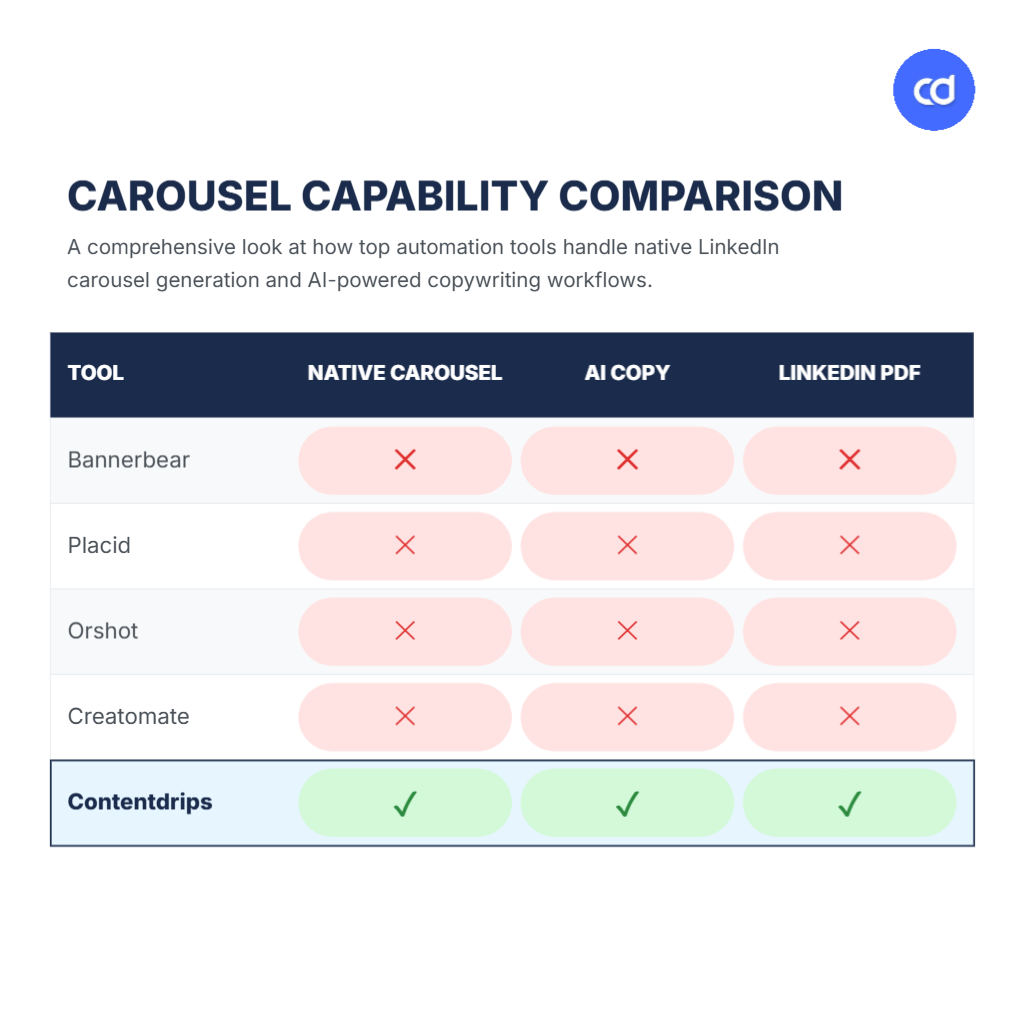
| Native carousel object | AI-generated carousel copy | PDF formatted for LinkedIn document posts | |
|---|---|---|---|
| Bannerbear | No, manual per-slide rendering | No | No |
| Placid | No, manual per-slide rendering | No | No |
| Orshot | No, manual per-slide rendering | No | No |
| Creatomate | No, manual per-slide rendering | No | No |
| Contentdrips | Yes, carousel_content in one call | Yes, ai_carousel | Yes, native output: "pdf" |
This is the comparison that doesn’t exist anywhere else publicly right now, and it’s the one that matters most if multi-slide content is actually your use case.
Where this still falls short
In the interest of being a buyer’s guide and not a pitch: Contentdrips’ API does not generate video, GIFs, or any motion output. It’s images and PDFs only. If video is part of your roadmap, look at Creatomate or Shotstack instead. And if your real need is a very large library of non-social templates at high single-image volume (certificates, badges, generic OG images at scale), Bannerbear’s longer track record and broader template count may serve you better than a tool that was built carousel-first.
Pricing, normalized
Credit and call structures across this category aren’t directly comparable on their face, so here’s roughly what each costs at a few common volumes.
| 500 calls/mo | 1,000 calls/mo | 5,000 calls/mo | |
|---|---|---|---|
| Bannerbear | ~$49 (1,000 included, can’t go lower) | $49 | ~$199+ |
| Placid | $19 (500 credits) | ~$39 | ~$150+ |
| Creatomate | Shared credit pool with video | $41 (2,000 credits, video included) | Scales with credit pack |
| Contentdrips | $39 (1,000 calls, Basic) | $39 | Advanced tier, 6,000/mo included |
Two things worth flagging that the sticker prices don’t show. First, several vendors, Bannerbear, Placid, Orshot, and DynaPictures among them, only offer trial credits, not a recurring free tier, so “free” often means “free once.” Second, watch for what we’d call the video tax: Creatomate and Bannerbear’s video features draw from the same credit pool as their images, so if any of your usage touches video, your effective image budget shrinks faster than the headline number suggests.
Five questions to ask before you pick one
- Single image, or multi-slide content? This is the question that sorts you into Bucket B or Bucket C, and it changes the right answer completely.
- Do you need the API to write the content, or just lay it out? Most tools assume you’re supplying finished copy. If you’re not, that’s a real constraint to plan around.
- What’s your real volume at 6 to 12 months, not today? Pricing tiers in this category have real cliffs between them. Model your growth, not your pilot.
- Does the output need to land directly on LinkedIn or Instagram, or is a file enough? A PDF that’s correctly formatted for a document post saves a conversion step every single tool without native carousel support makes you do manually.
- Is video ever part of the picture? If yes, even occasionally, weight that heavily. It rules out a few options outright and changes the math on the rest.
The verdict: this social media image API buyer guide’s bottom line
- Pick Contentdrips if you need carousels or document posts generated, and ideally written, programmatically, and you want that to publish straight to LinkedIn or Instagram.
- Pick Bannerbear if you need mature, well-documented single-image template rendering at scale and carousels aren’t part of the job.
- Pick Placid if you’re non-technical and want a Zapier-first or Make-first workflow for static graphics, with credit rollover as a nice-to-have.
- Pick Creatomate if video is genuinely part of your output mix and you’d rather not run two separate tools.
- Pick Orshot if per-image pricing at extreme scale and built-in video matter more to you than native carousel structure.
- Pick an AI-prompt API (OpenAI Images, fal.ai) if what you actually need is novel imagery, not branded templates at all.
FAQ
A few questions that come up often when people use a social media image API buyer guide like this one to make an actual decision.
Is the Contentdrips API worth it if I just need an image API, not the full app? Yes, if your use case includes carousels or document-style posts. That’s the gap most pure image APIs leave open. If you only need single static graphics with no social formatting requirement, a dedicated template API like Bannerbear or Placid may be a simpler fit.
How does the Contentdrips API compare to the Canva API? Canva’s API is built around editing and exporting existing Canva designs. It assumes you or your users are already working inside Canva. Contentdrips’ API is built to generate carousels and graphics programmatically from a template and data, with no Canva account or manual editing step required.
Is there a free alternative to the Contentdrips API? Several Bucket B tools offer trial credits, and Contentdrips’ app itself has a recurring free tier (50 AI credits). For ongoing API usage at any real volume, expect to be on a paid tier somewhere in this category. The free options are best for evaluation, not production.
Start building
The short version of this social media image API buyer guide: figure out your bucket first, then compare inside it, not across all of them at once. Contentdrips’ API includes 10 free calls to test against your own templates, no card required, available from the API page. If you’re trying to decide between using the Contentdrips app directly or building against the API, our decision-tree guide walks through exactly when each makes sense. And if Bannerbear is your main point of comparison, the full Bannerbear vs Contentdrips breakdown goes deeper than the table above.