
New Launch: Contentdrips MCP –Try for Free➜
BULK CAROUSEL GENERATOR
Upload a spreadsheet, generate hundreds of branded carousels in minutes. Built for agencies, content teams, and creators managing multiple topics at once.
HOW IT WORKS
Choose from hundreds of designed carousel templates. Each slide has labeled text fields that map to your CSV columns.
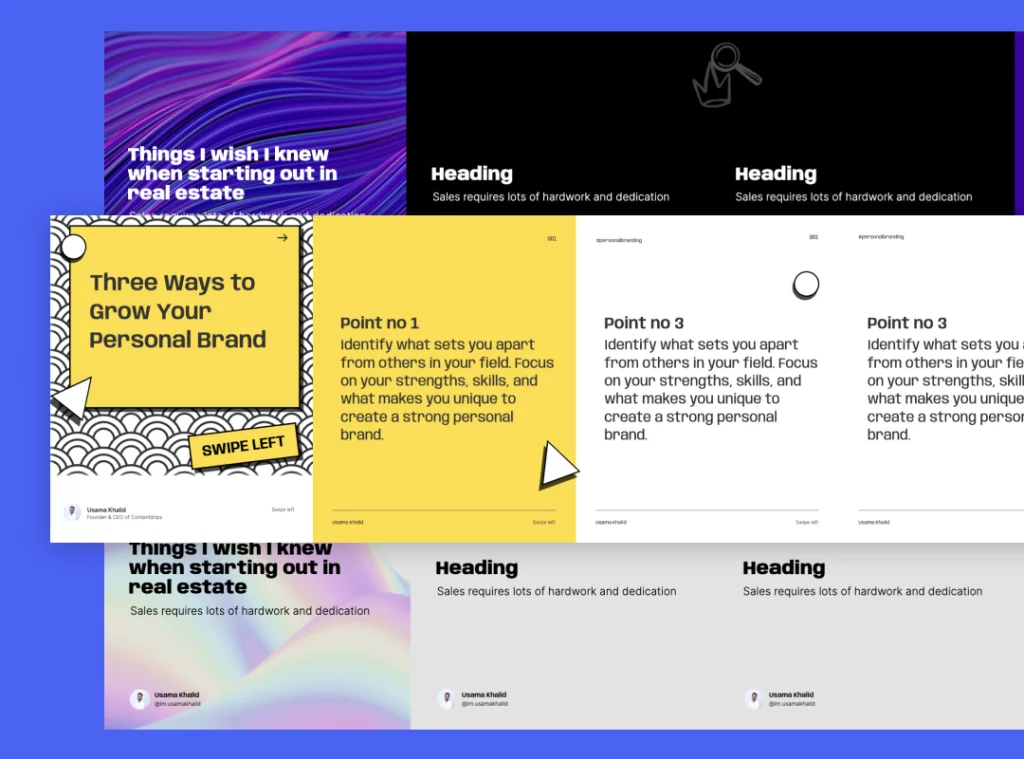
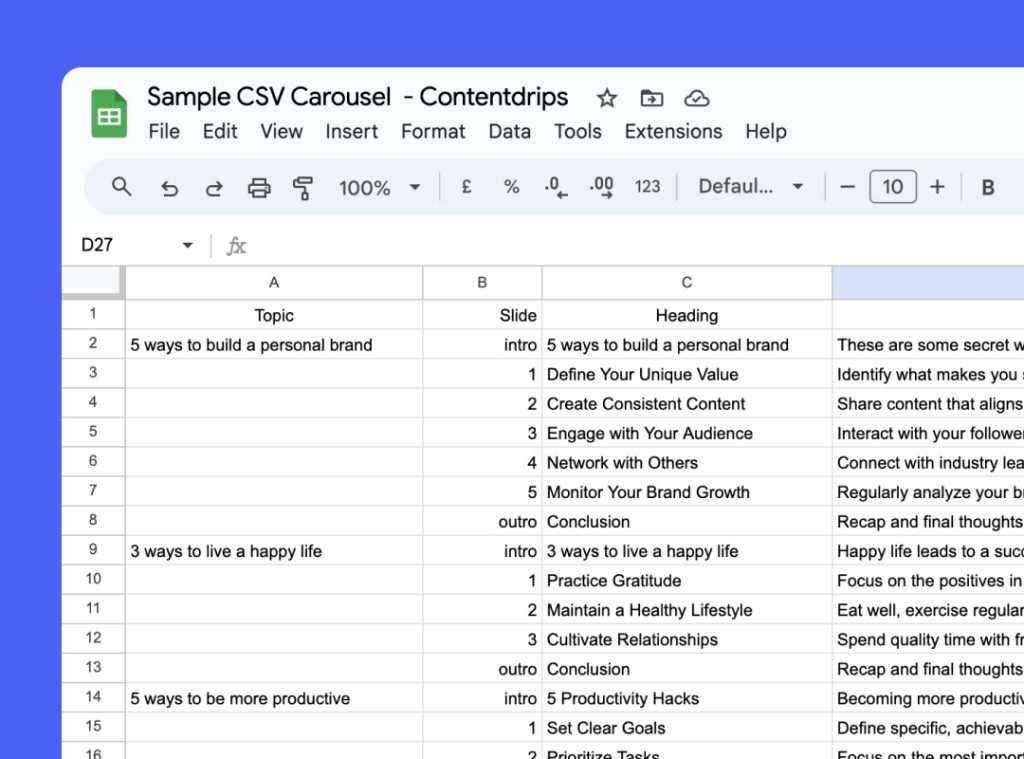
Use our ready-made prompt with ChatGPT or Claude to generate a perfectly formatted CSV in seconds. Copy, paste, export as .csv.
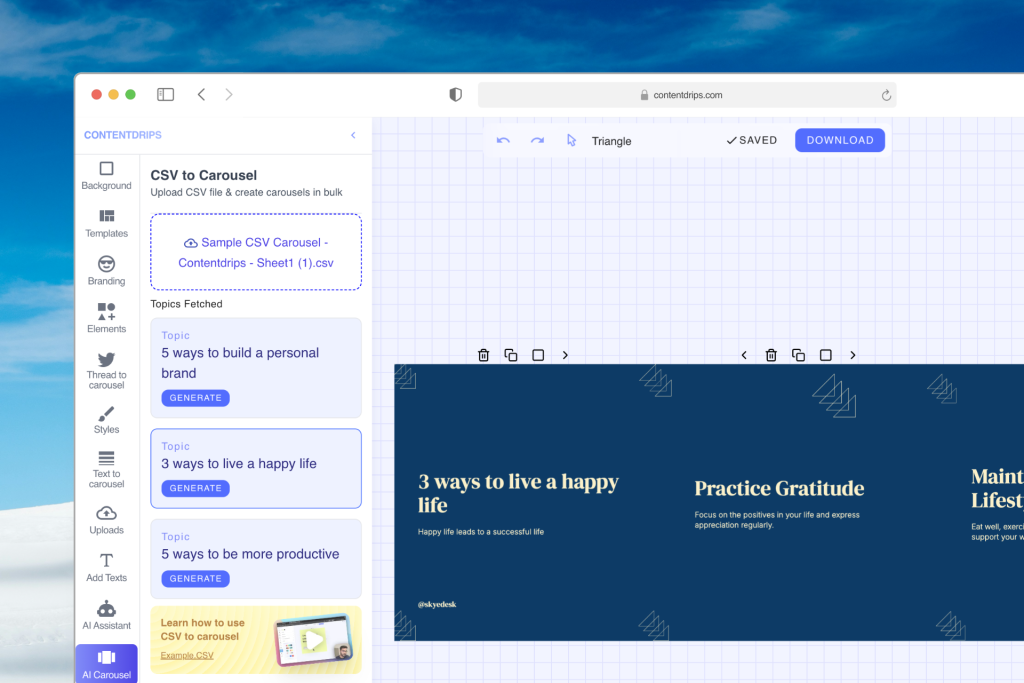
Upload the CSV inside the ContentDrips canvas. Click generate per topic and download all carousels as PDF or PNG. Done.
NEW CSV FORMAT
The new format uses per-label rows with a Label column that maps directly to your template’s text fields. Supports heading, description, and description_1 across intro, slide, and outro positions.
Item ID,Item Name,Slide,Label,Type,Value
1,Topic 1 - Item 1,intro,heading,text,"Things I wish I knew starting out"
1,Topic 1 - Item 1,intro,description,text,"Sales requires hard work and dedication"
1,Topic 1 - Item 1,1,heading,text,"Tip heading goes here"
1,Topic 1 - Item 1,1,description,text,"Tip body text goes here"
1,Topic 1 - Item 1,2,heading,text,"Second tip heading"
1,Topic 1 - Item 1,2,description,text,"Second tip body text"
1,Topic 1 - Item 1,outro,description,text,"Found this helpful? Tell me in the comments"
1,Topic 1 - Item 1,outro,description_1,text,"Follow me on"
2,Topic 2 - Item 1,intro,heading,text,"Another carousel heading"
2,Topic 2 - Item 1,intro,description,text,"Intro description for topic 2"
...
Allowed Label values: heading, description, description_1 | Slide values: intro, 1, 2, outro | Type values: text, image
AI PROMPT
Paste this prompt into ChatGPT or Claude, swap in your topics, and get a download-ready CSV in under a minute.
Generate 5 Carousels by following this exact CSV format.

TOPICS:
- {topic 1}
- {topic 2}
- {topic 3}
- {topic 4}
- {topic 5}

- Generate 5 distinct items total using the topics above.
- Set "Item Name" based on the topic + item number.

CSV columns (header row must match exactly):
Item ID,Item Name,Slide,Label,Type,Value

For carousel: include a "Slide" column with values: intro, outro, or a slide number (1..2).
Allowed "Type" values: text, image.
Allowed "Label" values (must match template meta_labels): "description", "description_1", "heading"

Template context:
INTRO SLIDE (Slide="intro"):
- description (text) sample: "Sales requires lots of hard work and dedication"
- heading (text) sample: "Things I wish I knew when starting out in real estate"

SLIDE 1 (Slide="1"):
- description (text) sample: "Sales requires lots of hard work and dedication"
- heading (text) sample: "Post Heading Goes Here"

SLIDE 2 (Slide="2"):
- description (text) sample: "Sales requires lots of hard work and dedication"
- heading (text) sample: "Post Heading Goes Here"

OUTRO SLIDE (Slide="outro"):
- description (text) sample: "Found this post helpful? Tell me in the comments below"
- description_1 (text) sample: "Follow me on"

Rules:
- Output a valid CSV file (include the header row).
- Use one row per field (Label) for each Item ID.
- For each Item ID, provide rows for intro + slides 1..2 + outro.
- After the CSV, also display the same data in a table view.
WHY BULK
Managing 10 clients? Generate a full month of carousels for every account in a single afternoon instead of grinding through them one by one.
Use the prompt above with Claude or ChatGPT to draft all your slide content automatically. You bring the topics; AI does the writing.
One template, hundreds of carousels. Your brand fonts, colors, and logo apply to every slide automatically with no manual adjustments.
Every generated carousel is fully editable in the ContentDrips canvas. Swap images, tweak copy, or adjust layouts before downloading.
Export as PDF for LinkedIn native carousels or as PNG files for Instagram. Both formats are optimized and ready to post.
There is no strict limit on how many carousels you can create in one batch. For very large files, split into smaller chunks for best performance.
A CSV to carousel generator lets you upload a spreadsheet file and automatically turn its content into multi-slide carousel posts for LinkedIn and Instagram. ContentDrips reads each row in your CSV, maps the text to the right slide fields in your chosen template, and generates branded carousel graphics you can download or publish directly.
ContentDrips uses a per-label row format with six columns: Item ID, Item Name, Slide, Label, Type, and Value. The Slide column accepts “intro”, a slide number (1, 2…), or “outro”. The Label column maps to your template’s text fields: heading, description, or description_1. Use the AI prompt above with ChatGPT or Claude to generate a correctly formatted CSV in under a minute.
Yes. Every carousel generated from a CSV is fully editable in the ContentDrips canvas editor. You can change text, swap images, adjust colors or fonts, and rearrange layouts before downloading. The CSV is just the starting point.
There is no strict batch limit. For best performance, keep individual CSV files to a manageable size. If you are generating a large volume, splitting across a few uploads works smoothly. Bulk generation is available on the Starter plan and above.
ContentDrips supports CSV files following the Item ID, Item Name, Slide, Label, Type, Value column structure. You can create this file manually, export it from Excel or Google Sheets, or use the AI prompt above to generate it automatically. Standard UTF-8 encoded .csv files work best.
Yes. After generating and reviewing your carousels you can schedule or publish them directly to LinkedIn and Instagram from inside ContentDrips. No need to download and re-upload elsewhere.
RELATED TOOLS
AI Carousel
Type a topic or paste a URL. AI writes the slides and designs the carousel for you. No CSV needed.
Paste any text and it gets distributed across slides automatically. Instant branded carousel with no design work.
Repurpose
Paste a blog URL and AI extracts the key points into a carousel ready for LinkedIn or Instagram.
Pick a template, prepare your CSV, and have a full month of carousels ready before lunch.